
Table of Contents
Introduction
DMVPN (Dynamic Multipoint Virtual Private Network) is a feature within the Cisco IOS based router family which provides the ability to dynamically build IPSEC tunneling between peers based on an evolved iteration of hub and spoke tunneling. DMVPN uses a combination of the following technologies :
- Multipoint GRE (mGRE)
- Next-Hop Resolution Protocol (NHRP)
- Dynamic Routing Protocol (EIGRP, RIP, OSPF, BGP)
- Dynamic IPsec encryption
DMVPN alleviates the need for multiple IPSEC configurations. This:
- reduces administration and management overhead
- allows for efficient scalability
Example
In the following example we will configure DMVPN between the Hub router and each of its spokes (router 2, 3 and 4). The steps will be broken broken down into the following sections:
- Physical Connectivity
- DMVPN Configuration
- IPSEC
- Dynamic Routing
PHYSICAL CONNECTIVITY
Below shows the physical topology along with the configuration for each of the routers.
HUB
interface f0/0
  ip address 192.168.1.100 255.255.255.0
  duplex full
  speed 100
  no shut
ip route 192.168.2.0 255.255.255.0 192.168.1.1
ip route 192.168.3.0 255.255.255.0 192.168.1.1
ip route 192.168.4.0 255.255.255.0 192.168.1.1
ROUTER 1
interface f2/0
    ip address 192.168.1.1 255.255.255.0
    duplex full
    speed 100
    no shut
interface f0/0
ip address 192.168.2.1 255.255.255.0
duplex full
speed 100
no shut
interface f1/0
ip address 192.168.3.1 255.255.255.0
duplex full
speed 100
no shut
interface f0/1
ip address 192.168.4.1 255.255.255.0
duplex full
speed 100
no shut
ROUTER 2
interface f0/0
    ip address 192.168.2.2 255.255.255.0
    duplex full
    speed 100
    no shut
interface loopback 0
ip address 172.16.2.1 255.255.255.0
no shut
ip route 192.168.1.100 255.255.255.255 192.168.2.1
ROUTER 3
interface f0/0
    ip address 192.168.3.3 255.255.255.0
    duplex full
    speed 100
    no shut
interface loopback 0
ip address 172.16.3.1 255.255.255.0
no shut
ip route 192.168.1.100 255.255.255.255 192.168.3.1
ROUTER 4
interface f0/0
ip address 192.168.4.4 255.255.255.0
duplex full
speed 100
no shut
interface loopback 0
ip address 172.16.4.1 255.255.255.0
no shut
ip route 192.168.1.100 255.255.255.255 192.168.4.1
DMVPN CONFIGURATION
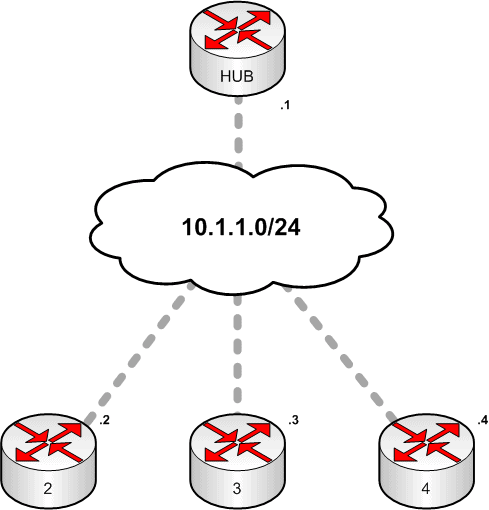
Once we have physical connectivity we can add the DMVPN configuration. The diagram below shows you the logical topology of our DMVPN network.
Note: Each tunnel is represented via the grey dotted lines.
HUB
interface Tunnel0
 ip address 10.1.1.1 255.255.255.0
 ip nhrp map multicast dynamic
 ip nhrp network-id 1
 tunnel source 192.168.1.100
 tunnel mode gre multipoint
 ip mtu 1416
ROUTER 2
interface Tunnel0
 ip address 10.1.1.2 255.255.255.0
 ip nhrp map 10.1.1.1 192.168.1.100
 ip nhrp map multicast 192.168.1.100
 ip nhrp network-id 1
 ip nhrp nhs 10.1.1.1
 tunnel source 192.168.2.2
 tunnel mode gre multipoint
 ip mtu 1416
ROUTER 3
interface Tunnel0
 ip address 10.1.1.3 255.255.255.0
 ip nhrp map 10.1.1.1 192.168.1.100
 ip nhrp map multicast 192.168.1.100
 ip nhrp network-id 1
 ip nhrp nhs 10.1.1.1
 tunnel source 192.168.3.3
 tunnel mode gre multipoint
 ip mtu 1416
ROUTER 4
interface Tunnel0
 ip address 10.1.1.4 255.255.255.0
 ip nhrp map 10.1.1.1 192.168.1.100
 ip nhrp map multicast 192.168.1.100
 ip nhrp network-id 1
 ip nhrp nhs 10.1.1.1
 tunnel source 192.168.4.4
 tunnel mode gre multipoint
 ip mtu 1416
IPSEC
Next we will need to add IPSEC, this will ensure that traffic is not sent in clear text. This configuration should be added to each router apart from router 1.
crypto isakmp policy 10
hash md5
encryption 3des
authentication pre-share
crypto isakmp key cisco123 address 0.0.0.0 0.0.0.0
crypto ipsec transform MINE esp-3des
crypto ipsec profile DMVPN
set transform-set MINE
interface tunnel0
tunnel protection ipsec profile DMVPN
DYNAMIC ROUTING
To enable dynamic routing using EIGRP add the following configuration onto each of your routers excluding router 1.
interface tunnel0
    ip hold-time eigrp 1 35
    no ip next-hop-self eigrp 1
    no ip split-horizon eigrp 1
router eigrp 1
network 192.168.0.0
network 172.16.0.0
network 10.0.0.0
no auto-summary
TESTING / DIAGNOSTICS
NHRP TUNNELS
HUB#sh dmvpn
Legend: Attrb --> S - Static, D - Dynamic, I - Incompletea
        N - NATed, L - Local, X - No Socket
        # Ent --> Number of NHRP entries with same NBMA peer
Tunnel0, Type:Hub, NHRP Peers:2,
# Ent Peer NBMA Addr Peer Tunnel Add State UpDn Tm Attrb
—– ————— ————— —– ——– —–
1 192.168.2.2 10.1.1.2 UP never D
1 192.168.3.3 10.1.1.3 UP never D
1 192.168.4.4 10.1.1.4 UP never D
DYNAMIC TUNNELS
To test for dynamic tunnels between spokes run the following command:
R3#ping 10.1.1.2
 Type escape sequence to abort.
Sending 5, 100-byte ICMP Echos to 10.1.1.2, timeout is 2 seconds:
!!!!!
Success rate is 100 percent (5/5), round-trip min/avg/max = 372/506/660 ms
R3#sh dmvpn
Legend: Attrb –> S – Static, D – Dynamic, I – Incompletea
N – NATed, L – Local, X – No Socket
# Ent –> Number of NHRP entries with same NBMA peer
Tunnel0, Type:Spoke, NHRP Peers:2,
# Ent Peer NBMA Addr Peer Tunnel Add State UpDn Tm Attrb
—– ————— ————— —– ——– —–
1 192.168.1.100 10.1.1.1 UP 00:15:48 S
1 192.168.2.2 10.1.1.2 UP never D
EIGRP
HUB#sh ip route
! Gateway of last resort is not set
      172.16.0.0/24 is subnetted, 2 subnets
D    172.16.2.0 [90/297372416] via 10.1.1.2, 00:02:02, Tunnel0
D    172.16.3.0 [90/297372416] via 10.1.1.3, 00:00:42, Tunnel0
D    172.16.4.0 [90/297372416] via 10.1.1.4, 00:00:42, Tunnel0
S    192.168.4.0/24 [1/0] via 192.168.1.1
     10.0.0.0/24 is subnetted, 1 subnets
C       10.1.1.0 is directly connected, Tunnel0
C    192.168.1.0/24 is directly connected, FastEthernet0/0
S    192.168.2.0/24 [1/0] via 192.168.1.1
S    192.168.3.0/24 [1/0] via 192.168.1.
References:
- http://packetlife.net/blog/2008/jul/23/dynamic-multipoint-vpn-dmvpn/
- http://blog.ine.com/2008/08/02/dmvpn-explained/

- NETCONF & YANG: Automate Network Configs via Python - April 2, 2026
- Palo Alto – How to Configure Your Next-Generation Firewall - April 2, 2026
- How to Harden Linux SSH: Keys, Fail2ban & Ciphers - March 1, 2026
Want to become a networking expert ?
Here is our hand-picked selection of the best courses you can find online:
Cisco CCNA Certification Gold Bootcamp
Complete Cyber Security Course – Network Security
Internet Security Deep Dive course
Python Pro Bootcamp
and our recommended certification practice exams:
Delta Practice Tests