
Within this article we will be creating a named serial pipe on 2 machines to allow us to connect to a virtual machines serial port.
In this example we will use hyperterminal on a virtual XP machine to connect to the serial port of another virtual machine (in this case SUSE Linux)
Table of Contents
Adding a serial port (named pipe) to your virtual machine
- Make sure the machine is switched off
- Right click on the virtual machine and select edit settings
- Under the Hardware tab select add.
- Select Serial Port then Next
- Select Named Pipe and enter a Pipe name (we will change the near end and far end in a mo)
- Click next and finish
Required Settings
Once we have a serial port on the 2 virtual machines (client and server) we need to set them accordingly.
Within the hardware settings of the virtual machines serial port you will need the following settings as follows,
- XP – Near End Client Far End Virtual machine
- SUSE – Near End Server Far End Virtual machine
Below you can see the settings for SUSE (the named pipe/serial connection on the SUSE box)
Below you can see the settings for XP (the name pipe/serial connection we are connecting to),
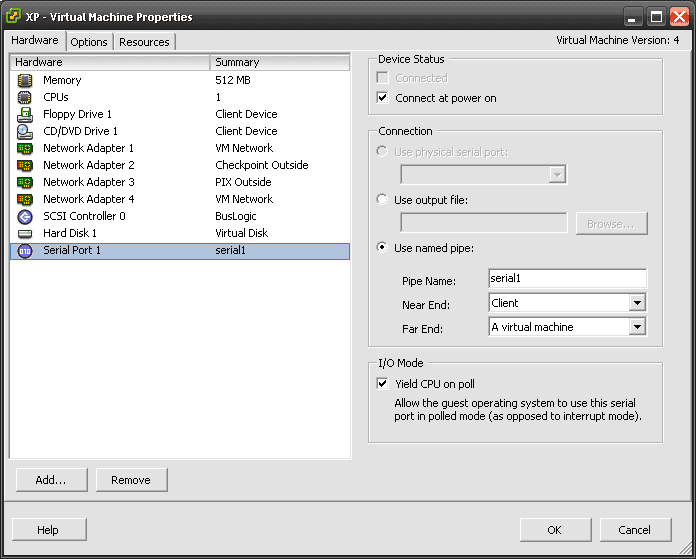
Connecting
In order to connect go into windows open hyperterminal and connect to COM1, you will now be connected to the named serial pipe.
Problems
If there is no connection you will need to make sure that you have not connected your Hyperterminal connection after the SUSE box has powered up. I normally open hyper-terminal in XP and then power the other device up.

- NETCONF & YANG: Automate Network Configs via Python - April 2, 2026
- Palo Alto – How to Configure Your Next-Generation Firewall - April 2, 2026
- How to Harden Linux SSH: Keys, Fail2ban & Ciphers - March 1, 2026
Want to become a VMware expert ?
Here is our hand-picked selection of the best courses you can find online:
Complete VMware Administration course
VMware vSphere 8 – Install, Configure, Manage
and our recommended certification practice exams:
Delta Practice Tests