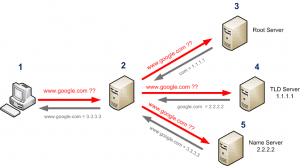
DNS servers are based on a recursive look up as you can see below. Below you can see XP forwarding the request to its DNS server. The DNS Server then recursively resolves the DNS request. Once it has the answer to the Clients request, it forwards the answer back to the client. A great tool … Read more
Below shows you how to enable SSH on your router using a username of “mr” and a password of “bean”, allowing access from the fa0/0 interface. Router(config)#ip ssh source-interface fastEthernet 0/0Router(config)#ip ssh authentication-retries 3Router(config)#ip ssh version 2 Router(config)#ip domain-name local.netRouter(config)#crypto key generate rsa modulus 768Router(config)#username mr password 7 bean Router(config)#line vty 0 15Router(config-line)# transport input … Read more
Below gives you an example of how to create a named Access-List, router(config)#ip access-list extended OUTSIDE_INrouter(config-ext-nacl)#permit ip any any
You will need to have already set your interfaces to inside and outside using the commands, ip nat ouside ip nat inside Once done you can add the command below. This would allow the IP 10.8.8.8 to be accessed on port 23 via the IP address of the interface fa 0/0 using port 2333. ip … Read more
To setup logging on your Cisco switch is pretty straight forward, you enable logging, you tell it what to log and then were to send it. Below is an example, Switch1#config t Enter configuration commands, one per line. End with CNTL/Z. Switch1(config)#logging ? Hostname or A.B.C.D IP address of the logging host buffered Set buffered … Read more
Below are a few steps to set up basic security on a router, Banner Set Banner. (config)#banner motd Passwords Set Secret enable password. (config)#enable secret <password> Set Line terminal passwords. (config)#line <terminal> <number>(config-line)#password <password>(config-line)#login Line Timeout On VTY set timout out (config-line)#exec-timeout <min> Copy the Config changes #(config) Copy running-config startup-config
In application software v6.0 and later, the Rapid Spanning Tree Protocol (RSTP) replaces the 802.1D Spanning Tree Protocol (STP). STP is pretty slow at recovering from a failure in the network. RSTP was created to decrease this recovery time. When a switch is running RSTP, a port can change from blocking to forwarding more quickly … Read more
Below shows the basic minimal configuration for create a Trunk Port. This will allow all VLANs to be sent (still VLAN tagged) out of fast ethernet 0/11. (config)#Int fast0/11(config-if)#switchport mode trunk(config-if)#switchport trunk encapsulation dot1q
A DTE (Date Terminating Equipment) cable is the normal cable you should use. Being DTE you should expect the other end to provide clocking.A DCE (Data Communication Equipment) means that this device must provide the clocking on the wire. If your device is the DCE, you must provide clocking using the clock rate command.
The Cisco Discovery Protocol (CDP) is a proprietary layer 2 network protocol developed by Cisco Systems that runs on most Cisco equipment and is used to share information about other directly connected Cisco equipment such as the operating system version and IP address. Globally (config)# cdp run(config)# no cdp run Interface To disable, (config-if)# no … Read more
Use the following commands to dictate which interface should be defined as the inside and outside. (config)access-list 1 permit 10.10.0.0 0.0.0.255 (config)#ip nat inside source list 1 interface FastEthernet0/0 overload Show/Debug Commands show ip nat translations debug ip nat no debug all
You will need to first install the flash module into the device. Then run the following commands via the console port (rommon), to check your systems resources for the install. rommon 1 > devrommon 2 > meminfo Then to copy it from your tftp server… rommon 3 > IP_ADDRESS=192.168.4.1 rommon 4 > IP_SUBNET_MASK=255.255.255.0 rommon 5 … Read more