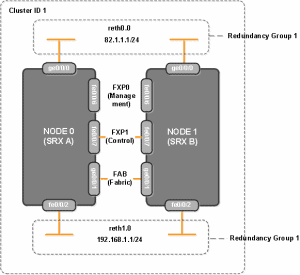
The Juniper SRX offers 4 types of High Availability (HA) deployment, Active/Passive Simple Active/Passive Full Mesh Active/Active Deployment Active/Passive Transparent Mode Within this article we will look at Active/Passive Simple upon a SRX 240 series device. Summary Active/Passive is the most common type of HA deployment and consists of 2 firewall members. Whilst one node … Read more
The are 2 main types of SA (Security Association) lifetimes ; soft and hard. Soft lifetime – The soft lifetime defines the number of seconds until the IKE process is informed that the SA is about to expire. This is to provide enough time for the creation of a new SA before the hard lifetime … Read more
To configure a Site to Site VPN between 2 Peers ; one with a Dynamic IP and the other with a static IP a dynamic crypto map is used. However as the static based peer will be unaware of the remote peers IP the VPN can only be initated from the dynamic side. Note : … Read more
Introduction Within this article we will look into how VPN filters work and also how to configure them on a Cisco ASA firewall. As the name suggests VPN filters provide the ability to permit or deny post-decrypted traffic after it exits a tunnel and pre-encrypted traffic before it enters a tunnel. Note : When the … Read more
IEEE 802.3ad (LACP) is a technology that provides a method of aggregating multiple Ethernet links into a single logical channel. Configuration To configure LACP the following commands are used. This example aggregates the interfaces fe-0/0/3 and fe-0/0/4 into a logical interface named ‘ae1’. This logical interface is then configured as an access port and assigned … Read more
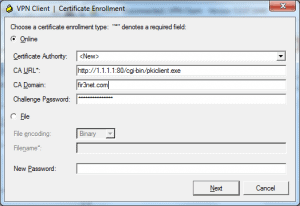
Within this article we will be showing the various steps required in configuring a Cisco ASA IPSEC VPN using digital certificates. These certificates will be signed by a CA (Cisco Router) and downloaded by the Client/ASA using SCEP (Simple Certificate Enrollment Protocol). Time/Date On the client, router and firewall ensure that NTP is configured and … Read more
Error When trying to connect using the Cisco VPN Client with certificate based authentication you receive the following error from you debug logs. CRYPTO_PKI: Certificate validation: Failed, status: 1873. Attempting to retrieve revocation status if necessary ERROR: Certificate validation failed. Peer certificate key usage is invalid, serial number: 210F2EDE0000000009AF, subject name: cn=xxxxx,ou=xxxx,o=xxxxx,c=xx CRYPTO_PKI: Certificate not … Read more
Introduction ASA 8.3 onwards brought a number of changes in how NAT is processed. First of all NAT is built around objects, this allows for IP`s to be changed and objects to be renamed much easier than previously. Also when configuring ACL`s the Real IP/Port address(s) are now used. Pre 8.3 access-list acl-outside extended permit … Read more
Within this tutorial we will show you the nessecary steps in configuring your ASA as a CA server. Time/Date First of all we set the time and date. asa-skyn3t(config)# show clock08:05:40.249 UTC Sun Sep 30 2012 Enable CA Next we enable the ASA as a CA server. asa-skyn3t(config)# crypto ca serverasa-skyn3t(config-ca-server)# subject-name-default cn=skyn3tca, o=skyn3t, c=UKasa-skyn3t(config-ca-server)# … Read more
Within this article we will configure a basic Anyconnect setup. The Anyconnect client provides the ability to securly connect to your LAN via TLS/DTLS (TLS over UDP). Enable WebVPN asa84(config)# webvpnasa84(config-webvpn)# enable outsideINFO: WebVPN and DTLS are enabled on ‘outside’.asa84(config-webvpn)# anyconnect image disk0:/anyconnect-win-2.5.2014-k9.pkgERROR: The specified AnyConnect Client image does not exist.asa84(config-webvpn)# anyconnect enableasa84(config-webvpn)# exit Create User … Read more
On the SRX Branch Series each interface can be configured as either layer 2 or layer 3. These are shown below : Routed Ports – Layer 3 (inet) Bridge – Layer 2 (only used for transparent mode) Ethernet-switching – Layer 2 (switchport) Within this article we will look at how to configure a trunk and … Read more
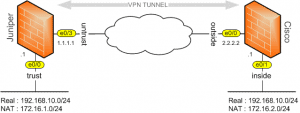
Purpose The purpose of this article is to describe the various steps required to create a site to site VPN between a Cisco ASA and a Juniper Netscreen when both sides have overlapping subnets. Example Within this example each side will have an endpoint of 192.168.10.0/24. Because of this both sides will present their endpoint … Read more
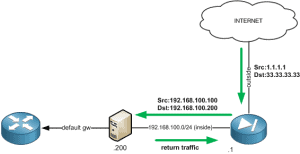
Twice NAT allows you to NAT both the source and destination within a single rule. Scenario A scenario where this type of configuration would be required is shown below. To ensure that any traffic originating from the Internet isn’t sent back out to its default gateway (asymmetrically routed) the source IP is translated to an … Read more
A Certificate Signing Request (CSR) is a base-64 encoded (PEM based) string which is generated using the users public key along with a number of attributes provided by the user such as DN, email, address etc. The CSR is then sent to the CA which it then uses to create a public certificate. The public … Read more
Purpose The purpose of this document is to explain the issues and problems surrounding the use of static NAT when using policy based VPN on a Juniper SRX Firewall. Background The issue, when using static NAT with a policy based VPN centres around how NAT is processed by the SRX, in that the Proxy ID`s … Read more
Purpose The purpose of this document is to explain the configuration methods required to assign to a group-policy to a user based on their OU group. Summary The Cisco ASA firewall includes the ability to assign a user to a group policy based on their OU group. This is achieved via the use of the … Read more
Below shows some of the main Juniper SRX commands available. All commands are provided with the necessary mode in which they should be run from. Configuration Commands replace pattern expr1 with expr # configuration mode find and replace string within configuration show | compare rollback {1..5} # configuration mode compare the current configuration against roll … Read more
Within the Cisco Firewall family (PIX/ASA) there are 2 security features known as Security Levels and NAT Control. Security Levels Security levels are numeric values (between 0 and 100) which are assigned to the firewalls interfaces and used to control traffic flows. Traffic is allowed to pass from a higher security level to a lower … Read more
Within this article we will look at the commands required for configuring a Site to Site VPN when one peer is using a dynamic IP address. Note : This article does not include the VPN configuration in its entirety only the additional/amended commands required for this scenario. There are 3 configuration settings that are defined. … Read more
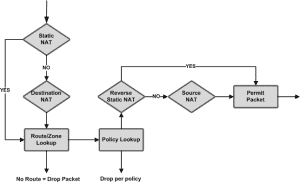
The Juniper SRX offers 3 main types of NAT. These are source, destination and static. In this article we will be providing explanations and configuration examples for each. Source NAT As the name suggests source NAT translates the source IP address. There are 2 main types of source NAT these are: Interface NAT – Traffic … Read more