DiffServ (Differentiated Services)A layer 3 protocol, defined by the IEFT. Used for adding QoS to IP networks. WFRED(Weighted Flow Random Early Drop)A process for managing packet buffers, by dropping packets during periods of network congestion.This is transparent to the user and requires no configuration. IQ (Intelligent Queuing Engine)Using information from the Check Point INSPECT engine … Read more
Check Point commands generally come under cp (general), fw (firewall), and fwm (management). Check Point Gaia commands can be found here. CP, FW & FWM cphaprob stat List cluster status cphaprob -a if List status of interfaces cphaprob syncstat shows the sync status cphaprob list Shows a status in list form cphastart/stop Stops clustering … Read more
General tcp/257 FireWall-1 log transfertcp/18208 CPRID (SmartUpdate)tcp/18190 SmartDashboard to SCStcp/18191 SCS to FW-1 gateway for policy installtcp/18192 SCS monitoring of firewalls (SmartView Status) SIC Ports tcp/18209 NGX Gateways <> ICAs (status, issue, or revoke).tcp/18210 Pulls Certificates from an ICA.tcp/18211 Used by the cpd daemon (on the gateway) to receive Certificates. Authentication tcp/259 Client Authentication (Telnet)tcp/900 … Read more
Heres a few PIX commands that may come in useful. Performance / Usage sh mem Shows memory used and amount free sh cpu Shows % of CPU used sh perfmon Show the performance of various connections sh traffic Show the traffic stats sh resource usage system Shows the system utilization sh service-policy Shows the amount … Read more
Below shows you the commands for creating a read-only account on a Cisco IDS. username <username> privilege viewer password <password> copy current-config backup-config
Event Log commands packet display Traffic sniffer show statistics event-store [clear] IDS Event Logs show statistics event-store IDS Event Logs show events [type] IDS Event Logs> System commands show interfaces Show interfaces show configuration Show system config show statistics logger System Logs show statistics sdee-server Show sdee server show statistics analysis-engine Show analysis stats show … Read more
Below is a custom signature that would create an alert on traffic running from any source to any destination with a destination port of 22, on flags push and ack, every 600 seconds. alert tcp any any -> any 22 (msg:”SSH TRAFFIC”; flags:PA; classtype:not-suspicious; threshold: type limit, track by_dst, count 1 , seconds 600 ; … Read more
This will show you the steps involved in exporting the settings of a Smart Centre Server for importing into a newly installed Smart Centre server, Download the upgrade_export utility and run it from $FWDIR/bin to export the config to a .tgz Transfer the tgz to another machine Uninstall all ngx packages and reboot Install new … Read more
Below are some of the various files and commands which you may find useful on a Check Point. Smart Centre Server $CPDIR/conf – Contains parts of the CPShared system * cp.license – license of machine * sic_cert.p12 – SIC certificate$FWDIR/lib – .def files which are used when the rulebase is complied into inspection code for … Read more
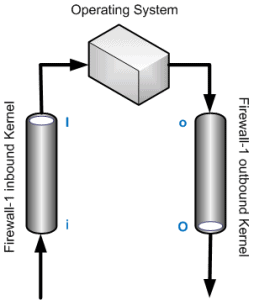
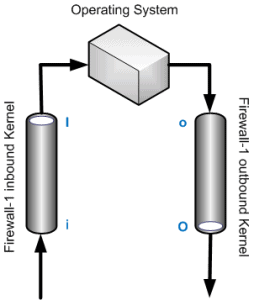
FW monitor is a great tool for troubleshooting traffic flow issues with your checkpoint. It works by using 4 inspection points, i – Pre Inbound I – Post Inbound o – Pre Outbound O – Post Outbound Examples fw monitor -e “accept dport=6000;” fw monitor -m iO -e ‘accept dport=80;’ fw monitor -e ‘accept dport;’ … Read more
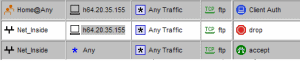
When adding an authentication action to a rule there are 3 types, User Session Client User authentication works by intercepting connects going through the FW-1 and prompting the user for authentication. To do this the firewall has to modify the traffic, so this authentication type can only be used with FTP, HTTP, Telnet and RLOGIN. … Read more
There are many types of NAT in the land of Check Point. Here’s a quick overview, Static NAT – One to one translation Hide/Dynamic NAT – Allows you to NAT multiple IPs behind one IP/Interface Automatic NAT – Quick basic address NAT translation. Manual NAT – Allows greater flexibility over automatic NAT. Proxy ARP is … Read more
Introduction Client and Server side NAT relates to when we perform destination NAT`ing. The “Translate destination on Server side” option is an legacy option which was included due to pre NG versions of checkpoint using Server-Side NAT. Client Side NAT – The destination address is NAT`d by the inbound Kernel Server Side NAT – The … Read more
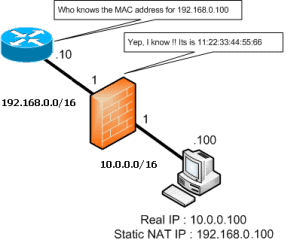
How do I configure proxy ARP on my SPLAT firewall ? There are 2 ways to get a packet to a firewall. A Route or a Proxy ARP. Using routes is the perferred method but it may be the case where you havent access to the routers and need to use Proxy ARP. Please note: … Read more
Introduction This is a guide on how to install a Free pix emulator / simulator onto a linux platform. You can also obtain the windows version, which you can find (along with other tutorials and forum) at the ariscahyadi blog. This software was written by mmm123, and is called PEMU, which is based on the … Read more
Below is an example of static NAT for FTP when using the outside interface with a DHCP address assigned to it. static (dmz,outside) tcp interface ftp 172.16.1.50 ftp netmask 255.255.255.255 static (dmz,outside) tcp interface ftp-data 172.16.1.50 ftp-data netmask 255.255.255.255
Nokia`s VRRP protocol allows for an active-standby firewall cluster. Nokia have added an extension to VRRP called VRRP monitored circuit which handles both total firewall failure as well as interface failures. Each virtual router uses a mac address of 00-00-5E-00-01-XX. XX being the Virtual Router ID (VRID).The multicast of 224.0.0.18 and IP protocol number 112 … Read more
When using a “inspect policy map” you need to add it to a “standard policy-map” to allow you to add it to the service policy.For each policy map there would be a class map, the inspect would match the FTP command, and then use the classmap “inspection-default” in the standard policy map. Running Config policy-map … Read more
Below shows the configuration syntax for configuring a Site to Site VPN on a Cisco PIX firewall. Configuration (config)#isakmp enable outside(config)#isakmp policy 10(config-isakmp-policy)# encryption aes-256(config-isakmp-policy)# hash sha(config-isakmp-policy)# authentication pre-share(config-isakmp-policy)# group 1(config-isakmp-policy)# lifetime 86400(config)#isakmp key shabba address 1.1.1.1 netmask 255.255.255.255 no-xauth(config)#access-list ED permit ip 172.16.1.0 255.255.255.0 172.16.5.0 255.255.255.0(config)#access-list nonat permit ip 172.16.1.0 255.255.255.0 172.16.5.0 255.255.255.0(config)#nat (inside) … Read more