Within the Cisco Adaptive Security Appliance Software Version 8.2(2) you may find that when you have a group-policy (vpn filter) applied to your tunnel group that some traffic is not being allowed through the VPN. This is a bug with 8.2(2), to resolve the issue you will need add the destination ports to the group-policies … Read more
A shared license lets you purchase a large number of SSL VPN sessions and share the sessions as needed amongst a group of security appliances by configuring one of the security appliances as a shared licensing server, and the rest as shared licensing participants.Below shows the steps on how to configure a Shared License server. … Read more
What is the Accelerated Security Path ? The Accelerated Security Path (ASP) on the ASA appliance comprises of 2 components; The Fast Path and The Session Management Path. In addition to the Accelerated Security Paths there is also the Control Plane Path which is also covered below. The Session Management Path When a new connection … Read more
In this article we will show you how to set traffic policing on traffic which is tranversing a VPN. Please Note : The command usage has changed from 8.0.4 to 8.2.1. When matching on a tunnel-group and policing at the same time you will have to also configure the match flow ip destination-address command to … Read more
In this article I will be showing you how to configure a Site 2 Site VPN on a ASA.Also included within this example is a group-policy (named “GROUPPOLICY100”) which we restrict access between the 2 endpoints to just tcp/80 traffic. Please Note : This example presumes that you have already created the object groups for … Read more
To allow you to view your preshared keys on your PIX ASA use the command `more system:running-config`. You can also view the preshared password with some versions of ASDM. Below shows the example of the command. pixfirewall# show run ! tunnel-group mytunnel type ipsec-rapre-shared-key * telnet timeout 5 Your preshared key ….. pixfirewall# more system:running-config! … Read more
NetFlow is a network protocol developed by Cisco Systems to run on a range of network devices for collecting IP traffic information. Previously only Cisco IOS routers and the Cisco 5580 ASA supported Netflow. But now with the introduction of Cisco ASA software 8.2, the complete ASA family now supports Netflow. There are 3 event … Read more
Summary When passing BGP traffic through a PIX you will need to configure the PIX to disable random sequence numbers to prevent MD5 Digest mismatches on either router. Please Note : Below presumes you all ready have a policy map defined with the name of global_policy and this has already been assigned to your device … Read more
When trying to create a Read only account (Priv Level 5), and logging into the ASDM using your readonly account you receive the following error, you do not have sufficient privileges to execute commands required to load asdm Solution This is due to the privilege levels not being configured correctly. The following will give you … Read more
Below shows you how to enable ICMP inspection on a PIX 8.0(4)28. Please Note : Below presumes you all ready have a policy map defined with the name of global_policy and this has already been assigned to your device using the service-policy command. PIX(config-cmap)# policy-map global_policyPIX(config-pmap)# class inspection_defaultPIX(config-pmap-c)# inspect icmp
Below is a sample config for 2 site to site vpns from a PIX running 8.0(4)16. One peer being 192.168.2.100, and the other 192.168.1.100. Please note : This isn’t a tutorial but merely just a sample config that can be used as a reference point. isakmp enable outside isakmp policy 10 encryption des … Read more
Below is a list of the main Instant Messenger applications (including ports and destinations) for the denial of use via policy based rules. Please note : With creating policy based rules the following rules will be required, Destination any with a service port of the below ports (excluding http and https) Destination of the below … Read more
Background PIX or ASA running 7.0 later introduce a security feature in which any packets containing an MSS larger then the announced size during the 3 way handshake will be dropped.During the 3 way hand shake both sides announce their MSS (Maximum Segment Size). The MSS is the largest TCP payload that the host can … Read more
Below you will find a bunch of commands that can be used to gain a clear picture of a PIX/ASA`s system health, sh resource usage system sh memory sh cpu sh service-policy sh asp drop sh logging | i -1- sh fail | i This
Below shows you how to upgrade your ASA to verson 8.04. 1. Enable scopy on your ASA firewall(config)#ssh scopy enable 2. Copy the image from your PC to the ASA, the command below is done on your PC via “Start / Run / CMD”. Download pscp here. pscp [image].bin [user]@[asa_ip]:[image].bin 3 .Change the boot order, … Read more
Below provides the nessecary steps required to create an a packet capture on an ASA/PIX, and the relevant download method. Note : You will requre pscp (putty pscp) installed onto your PC. Download pscp here. This is only available in the later versions of PIX & ASA. First of all start the capture. capture capturefile … Read more
Below will configure you interface with vlan50, ip address 1.1.1.1 with a name of outside. This will also bring up the interface. nameif ethernet0 outside security0ip address outside 1.1.1.1 255.255.255.0interface ethernet0 autointerface outside vlan50
To enable ssh on your PIX (6.3) run the following, hostname myfw domain-name home.net ca gen rsa key 1024 ssh 0 0 inside ssh timeout 60 passwd 123 ca save all When you go to log in your username will be pix and the password 123.
The following command will allow you to add a default route to your PIX device: route [interface name] 0 0 [default gw ip] Example route outside 0 0 1.1.1.1
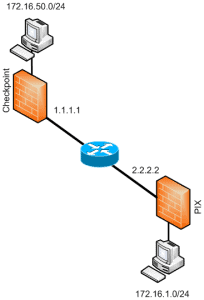
Below provide sample configurations required for building a site to site VPN between a Cisco PIX and a Check Point Firewall. PIX Configuration (config)#isakmp enable outside (config)#isakmp policy 10 (config-isakmp-policy)# encryption aes-256 (config-isakmp-policy)# hash sha (config-isakmp-policy)# authentication pre-share (config-isakmp-policy)# group 1 (config-isakmp-policy)# lifetime 86400 (config)#isakmp key shabba address 1.1.1.1 netmask 255.255.255.255 no-xauth (config)#access-list ED … Read more