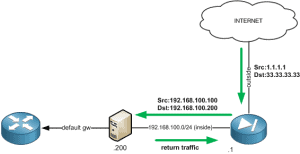
Twice NAT allows you to NAT both the source and destination within a single rule. Scenario A scenario where this type of configuration would be required is shown below. To ensure that any traffic originating from the Internet isn’t sent back out to its default gateway (asymmetrically routed) the source IP is translated to an … Read more
A Certificate Signing Request (CSR) is a base-64 encoded (PEM based) string which is generated using the users public key along with a number of attributes provided by the user such as DN, email, address etc. The CSR is then sent to the CA which it then uses to create a public certificate. The public … Read more
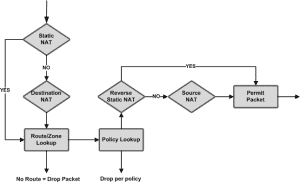
Purpose The purpose of this document is to explain the issues and problems surrounding the use of static NAT when using policy based VPN on a Juniper SRX Firewall. Background The issue, when using static NAT with a policy based VPN centres around how NAT is processed by the SRX, in that the Proxy ID`s … Read more
Purpose The purpose of this document is to explain the configuration methods required to assign to a group-policy to a user based on their OU group. Summary The Cisco ASA firewall includes the ability to assign a user to a group policy based on their OU group. This is achieved via the use of the … Read more
Below shows some of the main Juniper SRX commands available. All commands are provided with the necessary mode in which they should be run from. Configuration Commands replace pattern expr1 with expr # configuration mode find and replace string within configuration show | compare rollback {1..5} # configuration mode compare the current configuration against roll … Read more
Within the Cisco Firewall family (PIX/ASA) there are 2 security features known as Security Levels and NAT Control. Security Levels Security levels are numeric values (between 0 and 100) which are assigned to the firewalls interfaces and used to control traffic flows. Traffic is allowed to pass from a higher security level to a lower … Read more
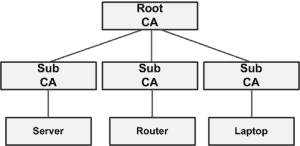
Purpose The main purpose of this document is to explain the PKI term ‘Chain of Trust’. Summary PKI (Public Key Infrastructure) is a framework built upon protocols, services and standards used to provide authentication, confidentiality, integrity, non-reproduction and access control to digital data. The term ‘Chain of Trust’ is used to describe the trust relationship … Read more
Within this article we will look at the commands required for configuring a Site to Site VPN when one peer is using a dynamic IP address. Note : This article does not include the VPN configuration in its entirety only the additional/amended commands required for this scenario. There are 3 configuration settings that are defined. … Read more
The Juniper SRX offers 3 main types of NAT. These are source, destination and static. In this article we will be providing explanations and configuration examples for each. Source NAT As the name suggests source NAT translates the source IP address. There are 2 main types of source NAT these are: Interface NAT – Traffic … Read more
Below shows the necessary steps/commands to create a route based VPN on a Juniper SRX series gateway. The main difference with a route based VPN is that a tunnel interface is created and assigned to your external interface. Any traffic that you wish to encrypt is routed to this tunnel interface. Access to and from … Read more
Within this tutorial we will be showing you how to configure Remote Access VPN (Dynamic VPN) on the Juniper SRX. IKE Configure Aggressive Mode set security ike policy ike-dyn-vpn-policy mode aggressive set security ike policy ike-dyn-vpn-policy proposal-set standard Define Preshared Key set security ike policy ike-dyn-vpn-policy pre-shared-key ascii-text <PRE-SHARED KEY> Configure the IKE Gateway Here … Read more
Below shows the necessary steps/commands to create a policy based VPN on a Juniper SRX series gateway. The main difference with a policy based VPN is that the tunnel action is defined within each security policy. Note : For troubleshooting steps please see here This VPN is configured with the following : Remote Endpoint : … Read more
Within this tutorial we will be providing the steps required to upgrade your Juniper SRX firewall. Copy Image First of all we copy the image over to the SRX via the use of scp. In this case I have used putty’s pscp. C:\Windows\System32>pscp “C:\Users\admin\Downloads\junos-srxsme-11.4R1.6-domestic.tgz” root@[SRX IP]:/mfs Confirm Hash Next we confirm that the file is … Read more
Below provides a short guide in configuring source NAT with an address pool on a Juniper SRX. The following example creates a pool with a 10.1.1.0/24 network. This pool of addresses are then used during the translation of source addresses. In addition to the pool we also configure the following options: set address-persistent – this … Read more
Within this article we show you the required steps for obtaining a packet capture on your SRX series firewall. Note : Great care should be taken when applying captures to ensure that only the traffic that you want to capture is defined within the firewall filter. This is to prevent any unnecessary load being placed … Read more
Issue When running the command ‘show service-policy interface outside set connection detail’ the SSH thread incorrectly tries to access the wrong memory area. This results in the Cisco ASA rebooting. This issue is also referenced within the Cisco caveat CSCtf22329. Solution Upgrade to software version 8.2.5(22).
To create a range of ports within the SRX the following command is used. This example creates an application object named UDP-PORT-RANGE with a UDP port range of 5000-6999. set applications application UDP-PORT-RANGE protocol udp destination-port 5000-6999 Once created you can then add this to a group. This group can then be added to the necessary … Read more
Within this example we will configure modular policy framework to define a range of connection limits. This provides a basic means of protecting your environment against DoS attacks. Define Traffic First of all we define which traffic the MPF policy will be applied to. In the example below we exclude the host 8.8.8.8 whilst inspecting … Read more
Being that this command is slightly obscure I thought it was worth documenting. To clear the Cisco ASA connection counter the following command is used. cisco-asa(config)# clear resource usage resource conns