
IT Security & Network Engineering Knowledge Base

Practical documentation and technical guides on network security, firewalls, Linux systems, monitoring, and automation.
We feature technical articles across the entire IT spectrum - Built from real-world experience and continuously updated.

Cisco ASA – How do I capture ARP`s ?

Below shows the necessary commands to capture ARP packets on a Cisco ASA Firewall. Syntax ASA(config)# capture arp ethernet-type arp interface dmz  Display ASA(config)# show capture arp2 packets captured 13:12:23.478229 arp who-has 10.1.1.1 tell 10.1.1.10013:12:26.784194 arp who-has 10.1.1.1 tell 10.1.1.1002 packets shown
Juniper SRX – Configuring Source NAT with pool

Below provides a short guide in configuring source NAT with an address pool on a Juniper SRX. The following example creates a pool with a 10.1.1.0/24 network. This pool of addresses are then used during the translation of source addresses. In addition to the pool we also configure the following options: set address-persistent – this … Read more

Running a packet capture on a Juniper SRX

Within this article we show you the required steps for obtaining a packet capture on your SRX series firewall. Note : Great care should be taken when applying captures to ensure that only the traffic that you want to capture is defined within the firewall filter. This is to prevent any unnecessary load being placed … Read more

Tool – SSLReport

SSLReport provides the ability to scan a network and determine which hosts are running SSL/TLS based services and then query each of these servers/ports to determine which ciphers are supported. The output of this is then outputted within a CSV based format. Usage [root@william images]# bash sslreport.txt 10.1.1.0/23 home Checking for Binaries …..  *Successful execution … Read more

Brocade ADX – How to perform an image upgrade

Below shows the basic steps for upgrading a Brocade ADX. Copy Image First of all the image is copied from a TFTP server. Note : The option ‘secondary’ is used to ensure that the primary image is not overwritten. adx# copy tftp flash [tftp server ip] ASR12301c.bin secondary Check Flash Next, check the image has … Read more

Brocade ADX – Persistence

The Brocade ADX offers 2 main persistence methods ; sticky and cookie. Within this article we will look at both of these methods and the various configuration options of each one. Types Sticky With sticky traffic is sent to the same server based on the clients IP for duration of the sticky timeout duration. Sticky also … Read more

How to define a port range on a Juniper SRX

To create a range of ports within the SRX the following command is used. This example creates an application object named UDP-PORT-RANGE with a UDP port range of 5000-6999. set applications application UDP-PORT-RANGE protocol udp destination-port 5000-6999 Once created you can then add this to a group. This group can then be added to the necessary … Read more

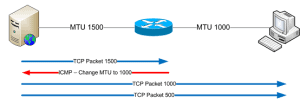
Path MTU Discovery (PMTUD) / Path MTU Black Holes

What is MTU ? When sending traffic across a network, computers use something called an MTU (Maximum Transmission Unit). This (network interface) setting dictates the size of the largest frame it can send across the network. Below shows the MTU default, Network MTU(Bytes) X.25 576 IEEE 802.3/802.2 1492 Ethernet 1500 FDDI 4352 Token Ring 17914 … Read more