How to Configure Your Next-Generation Firewall (NGFW) Next-generation firewalls offer far more than packet filtering, but most production deployments underutilize them — relying on port-based rules while leaving TLS inspection disabled and application control unconfigured. This walkthrough covers the three controls that matter most: zone-based segmentation, TLS/SSL deep inspection, and layer-7 application filtering. Examples use … Read more
Accurate time synchronization is a foundational requirement for any network equipment as it ensures reliable logging, correct event correlation, and proper operation of security mechanisms. FortiGate supports NTP configuration via GUI and CLI. Below provides the basic commands for configuring the date, time and NTP on your Fortinet Firewall using CLI. Configure NTP using FortiGuard … Read more
Recently I’ve discovered that there is, well, fairly limited information online around this point. In this short article we will explain how ICMP inspect, whether disabled or enabled, affects the connection table. What is ICMP Inspect? “The ICMP inspection engine allows ICMP traffic to be inspected like TCP and UDP traffic. Without the ICMP inspection … Read more
Problem Lets consider the following scenario. We have a firewall with 3 interfaces, Outside, Inside and DMZ. When traffic is sent to the DMZ segment, the NAT rule below is matched. This results in traffic being sent out of the outside interface, rather then out the DMZ interface. Surely this cant be right ! object-group … Read more
Service Offload Configuration Commands 1. First configure the FPC/PIC (I believe on the SRX1400 if the NP-IOC is in slot 2 it would be FPC2 PIC0 but you can confirm) 2. Then setup a policy from zone x to zone y to allow whatever addressing/protocol and permit services-offload feature for that traffic 3. Then confirm … Read more
Below are some of the most useful commands for the administration within the Gaia CLISH. show commands save config save the current configuration show commands shows all commands show allowed-client all show allowed clients show arp dynamic all displays the dynamic arp entries show arp proxy all shows proxy arp show arp static all displays … Read more
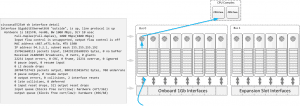
Introduction Within this article we will take an in-depth look into the architecture of the Cisco ASA 5585X. CHASSIS The Cisco ASA 558X is a chassis based firewall. The chassis consists of 2 slots, each slot can be populated with either an SSP (Security Services Processor) or Interface Module (ASA5585-NM-XX). The SSPs come in various … Read more
Within this article we will provide the necessary commands required to create a read-only account on a Juniper SRX. Within our example a user is created with the following attributes, A user with the username of ‘user1‘. ONLY allowed to use the show command. SNMP configuration is REMOVED from the configuration output. The policy-options and … Read more
TCP Normalization To provide protection from attacks, the Cisco ASA provides a feature called TCP normalization. TCP normalization is enabled by default and can detect abnormal packets. Once detected these packets can be either allowed, dropped or cleared of its abnormalities. To configure the TCP normalizer changes are made within the tcp-map. The tcp-map is … Read more
Within this article we will provide the steps required to enable IPv6 on a Juniper SRX device. IPv6 Forwarding First of all we enable IPv6 forwarding. Once this is added you will need to reboot the device. set security forwarding-options family inet6 mode flow-based You can confirm that IPv6 forwarding is enabled once the device … Read more
The ability to configure EtherChannels on ASA models 5510 and above was introduced within 8.4/8.6. An Etherchannel provides a method of aggregating multiple Ethernet links into a single logical channel. Within this article we will provide the steps required to create an Etherchannel link on the Cisco ASA along with providing the main troubleshooting/show commands. … Read more
The Juniper SRX provides an extensive set of options to block and prevent both internal and external based network attacks. Within this article we will look at the various options and settings to block, Sweeps – Horizontal scans, i.e scans across an IP range. Port Scans – Vertical scans, i.e scans across multiple ports on … Read more
Introduction Introduced within Cisco ASA version 8.4(2), Cisco added the ability to allow traffic based on the FQDN (i.e domain name). This feature works by the ASA resolving the IP of the FQDN via DNS which it then stores within its cache. Traffic is then either denied or permitted accordingly. Within this article will look … Read more
Issue This is a nasty little big I found the other day which hopefully you can avoid after reading this article. When using SCP to copy a file to/from the ASA that is over 100k the transfer stalls and then fails. This results in an orphaned ssh_init process. Each ssh_init process then still occupies a … Read more
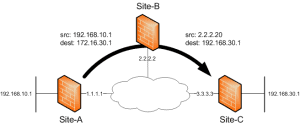
Purpose The purpose of this article is to explain the configuration steps required in configuring a hairpinned VPN with double NAT on a Cisco ASA firewall (running 8.0). Terms Within this article there are 2 key terms that you will need to know. They are, Hairpinning (U-turn Traffic) – Hairpinning is a term to … Read more
Issue You may experience a slow memory leak within your crypto based processes when running SNMP on your Cisco ASA device. Solution The bug has been resolved within 8.2(5)46 under caveat CSCuh48577.
Issue When trying to run a capture you experience the following error, asa-skyn3t(config)# access-list cap-acl permit ip any any asa-skyn3t(config)# capture inside interface inside access-list cap-acl ERROR: Capture doesn’t support access-list <cap> containing mixed policies Solution Within ASA 9.0 the ‘any’ keyword now represents all IPv4 and IPv6 traffic. And the new keywords ‘any4’ and … Read more
Within this article we will show you the steps required to build an IKEv2 IPSEC Site to Site VPN on a Cisco ASA firewall. IKEv2 provides a number of benefits of its predecessor IKEv1, such as ability for asymmetric authentication methods, greater protection over IKE DoS attacks, interoperability between vendors for DPD/NAT-T, and less overhead and … Read more
Issue Traffic is sent out from the ASA unencrypted. Cause This can be caused by a duplicate (stale) ASP crypto table entry, this prevents the ASA encrypting any traffic destined for the remote host. There are 2 commands which shows this behaviour. They are, Interface outside:!out id=0xd616fff0, priority=70, domain=encrypt, deny=false hits=855899, user_data=0x473ccf4, cs_id=0xd5deba08, reverse, flags=0x0, … Read more
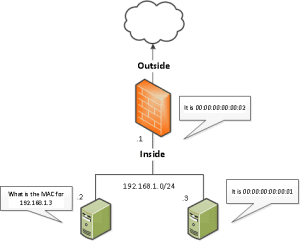
Issue You may observe the ASA incorrectly proxy ARPing for an IP address resulting in connectivity issues . Background Within 8.4(2) and 8.6(1) the following NAT changes were introduced.This basically states that Proxy ARP is enabled by default on both static and identity based NAT statements. Reference : http://www.cisco.com/en/US/docs/security/asa/asa84/configuration/guide/intro_intro.html Identity NAT configurable proxy ARP and … Read more