Persistence When an application maintains the session, a persistent session between the client and server must be correctly maintained to ensure the server can continue to process client requests. A typical example is web based shopping carts, this normally requires the user to maintain persistence to a single server during the lifetime of the session. … Read more
The BigIP F5 LTM supports various load balancing methods. These methods are categorized as either Static or Dynamic. Dynamic load balancing methods are considered balancing methods that take the server performance into consideration.This article also explains how the BigIP F5 LTM can balance traffic outside of the fore-mentioned Static and Dynamic balancing methods. Static Round … Read more
A sorry server provides HA (Primary/Secondary) based balancing for your backend servers. This allows traffic to only route to the sorry server in the event of the primary service becoming unreachable. Below details the configuration. This example sets server 1 as the primary server and server 2 as the secondary server. Configure Services service server1 … Read more
Introduction Output drops are a result of the traffic rate exceeding the maximum bandwidth specification of a given interface. Given that this is normally an outcome to interface congestion the following steps explain the commands used to clarify the total interface usage in both terms of Mbits and overall utilization. Output Drop Totals To confirm … Read more
Big IP`s F5 LTM offers 2 types of NAT. These are SNAT and NAT. SNAT (Secure Network Address Translation) provides source NAT. The SNAT option ‘Automap’ enables source NAT`ing (SNAT) based on the IP address of the egress interface. NAT (Network Address Translation) – NAT provides a static one to one NAT translation. Configuring SNAT … Read more
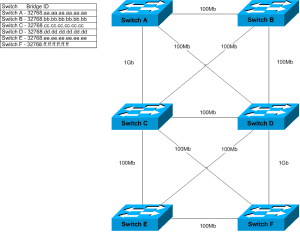
1. INTRODUCTION The Spanning Tree Protocol (STP) is a network protocol that ensures a loop-free topology for any bridged Ethernet local area network. The basic function of STP is to prevent bridge loops and ensuing broadcast radiation. 2. ROLES Spanning Tree defines 3 port roles. They are: Root Port Designated Port Blocking (Alternative Port) 3. … Read more
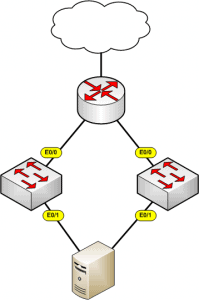
Link State Tracking is a feature (within Cisco Switches) that binds the link state of multiple interfaces. This provides the ability to “down” interfaces based upon the link state of upstream interfaces. The diagram below shows a simple of example of an scenario where link state tracking would be required. As you can see from … Read more
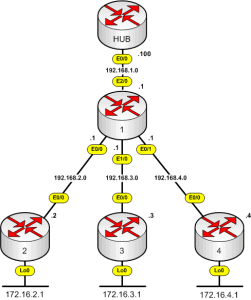
Introduction DMVPN (Dynamic Multipoint Virtual Private Network) is a feature within the Cisco IOS based router family which provides the ability to dynamically build IPSEC tunneling between peers based on an evolved iteration of hub and spoke tunneling. DMVPN uses a combination of the following technologies : Multipoint GRE (mGRE) Next-Hop Resolution Protocol (NHRP) Dynamic … Read more
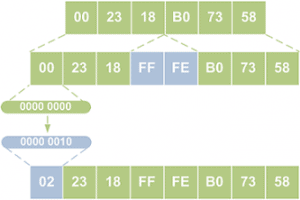
IPv4 is the current protocol used for sending data over the internet. The main issue with IPv4 is its limited address space. With the amount of available IPv4 address rapidly shrinking IPv6 overcomes this by introducing 128 bit addresses and a much larger address space to that of IPv4. 1. Changes Introduced by IPv6 Summary … Read more
Below shows the configuration for one side of a Site to Site VPN between 2 Cisco routers using pre-shared keys. router(config)# crypto isakmp enable Phase 1 router(config)# crypto isakmp policy 10 router(config-isakmp)# authenticaton pre-share router(config-isakmp)# encryption [?] router(config-isakmp)# group [?] router(config-isakmp)# hash [?] router(config-isakmp)# lifetime 86400 router(config)# crypto isakmp identity address router(config)# cryption isakmp [key] … Read more
The other day someone asked me to explain subnetting. It had been a while so I dusted off my CCNA books and attempted to answer his questions. So I thought this would be an ideal time to jot down some notes for future reference. This isnt a tutorial or guide but just some some notes … Read more
Below is a guide to the main areas and features that you should be aware of to ensure that your Cisco Catalyst switch is fully secured within your network. 1. PASSWORDS First of all passwords are configured. One password is used for the enable password and the other will later be assigned to the console … Read more
Reflective access-lists allows the router to pass “established” tcp traffic that has been previously allowed via another ACL. Due to routers to not having (by default) a state table, this ensures that you do not have to create additional access list entries to allow the return traffic of a permitted tcp session. (config)# ip access-list … Read more
In a worst case scenario someone could gain access to your router, clear the boot image and config. This would result in a lengthy down time and a lot stress. Cisco have tried to address this but the use of the following commands which prevents the clearing of your config and boot image (config) # … Read more
Below shows a number of commands that you can use for securing your Cisco router. Block Denied Logins – Useful for delaying denied logins when someone is trying to brute force your router. (config)# login block-for [seconds] attempts [attempts] within [seconds] Quiet Login – Allows you to still login once the router has blocked login … Read more
CLI Views allow your to to create sub administrator within your Cisco device. This can also be thought of as an extension to privilege levels, giving you further granularity over what your users are allowed to do. Creating views Below shows you the commands required to create a view mode. In all the examples we … Read more
TACACS+ (Terminal Access Controller Access-Control System Plus) is a Cisco proprietary protocol which provides access control for routers, network access servers and other networked computing devices via one or more centralized servers. TACACS+ uses port tcp 49 and provides separate authentication, authorization and accounting services. Below shows you the general steps involved, First of all … Read more
SDM (Security Device Manager) allows you to configure and manage your router via the use of a GUI. Please find the steps below : Download the SDM-Vxx.zip file from Cisco’s website. Ensure that you have the sdmconfig*.cfg file within your routers flash for your version of router. You can confirm this by using the command … Read more
This was a question i raised a while ago but never ended up getting round to creating an article. So as we know the basics of traceroute is that it sends out a bunch of UDP packets each packet with a TTL 1 higher then the previous one. When the hop receives the packet and … Read more