In order to set the hostname on CentOS you will need to change the HOSTNAME section within /etc/sysconfig/network Your hostname will now be updated once you logout and then back in. Its also worth noting that this will survive reboots.
In order configure your Ubuntu/Debian box to access HTTP, HTTPS and FTP via a Proxy you will need to assign some environment variables. Assign Environmental Variables Below shows you the different variables you need to declare : export HTTP_PROXY=[PROXY IP]:[PORT]export HTTPS_PROXY=[PROXY IP]:[PORT]export FTP_PROXY=[PROXY IP]:[PORT] Survive reboot To survive a reboot you need to add these … Read more
In both Vista and Windows 7 Microsoft (have by default) disabled the Telnet client in an attempt to approve the security of the operating systems. Below lists the steps that are needed in order to enable it : Goto Start Goto the Control Panel Open Programs And Features Select Turn Windows features on or off … Read more
Below is a basic template for setting up IPTables on a Linux box : Create LOGDROP CHAIN. Add LOG and DROP to chain. iptables -N LOGDROP iptables -A LOGDROP -j LOG –log-level 6 iptables -A LOGDROP -j DROP Create input and output policies iptables –policy INPUT DROP iptables –policy OUTPUT DROP Add inbound rules iptables … Read more
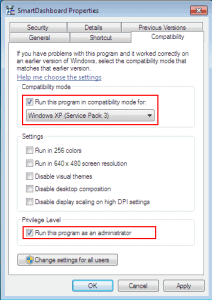
So you have Windows 7 but you either cant find the Windows driver for your Sound Card or your trusted old Windows XP program fails to work under your new OS. If so there is a way to allow you to run a program using the compatibility mode of your previous (working) Windows version. Steps … Read more
In this article we will show you the steps involved in configuring you Windows XP device with IPv6. All commands should be run via the command prompt. Enable IPv6 ipv6 install Configure IP If you are not using Stateful or Stateless IPv6 address Autoconfiguration you can manually configure your settings using the following commands : … Read more
When running an upgrade_export on a Solaris Smart Centre you may receive the following error : Compressing the files… gtar: Only wrote 2047 of 10240 bytes to export.tgz.tar gtar: Error is not recoverable: exiting now Error: Failed to execute ‘gtar -c -C “/opt/CPsuite-R65/fw1/tmp/upgrade_temp_dir” -f “export.tgz.tar” .’ command [ 26409 1]@#######[10 May 15:35:27] Compress: … Read more
When running a tcpdump within ESX you may see only broadcast traffic this is due to your vSwitch not being in promiscuous mode. To resolve this do the following : Within the vShpere Client go to Configuration / Networking. Choose the virtual switch that your would like to capture the traffic on. On the virtual … Read more
In order to remove all hyperlinks from a word document follow these steps : Press CRTL + A to select the whole document Press CTRL + SHIFT + F9. All hyperlinks will now be removed.
Belows shows the steps for backing up your iPhone contacts. Open iTunes Plug in your phone to the computer Open the program “Address book” via Start | Programs | Accessories. Within iTunes click on the phone icon on the left. Click on Info, and under “Contacts” select “Sync contacts from” and then choose “Windows address … Read more
In order to run a tcpdump on ESX you will need to add a service console to your virtual switch. This is achieved via the following steps : Set the Virtual Switch to Promiscuous Within the vShpere Client go to Configuration | Networking. Choose the virtual switch that your would like to capture the traffic … Read more
To resolve the issue of the error : The specified key, name or identifier already exists From the command line of the ESX box run the following command : [root@ESX root]# service mgmt-vmware restart If this fails to resolve the issue run the following commands : service mgmt-vmware restart service vmware-vpxa restart service vmware-vmkauthd … Read more
This document will provide the required steps in order to upgrade the SMS Brightmail appliance from 7.6.1-14 to 8.0.0.24. Backup 1. Navigate to “Administration > Hosts > Version” 2. Click “Backup Now” 3. Under “Backup Data” select “Full Backup” 4. Under “Backup To” select “Store Backup on server” 5. Click “Backup Now” 6. Download the … Read more
From time to time you may find that you have a number of processes (with the same name) that you want to terminate. Rather than kill each one individually you can run the following command to kill the complete lot in one go. C:\Documents and Settings\admin>tskill [process name] Example : Below shows you how you … Read more
You may receive the following error when using VI within Solaris, Terminal too wide To resolve this increase the number of columns with the command stty columns 120
What is encoding / decoding ? Encoding refers to the process of translating a file into an ASCII based string. Decoding refers to the process of decoding the ASCII based string. In order to perform this decoding/encoding process Base64 is typically used. Base64 is a program that converts each 6 bits and then converts this … Read more
After removing a computer from a domain you cannot login and receive the follow error : The system could not log you on. Make sure your user name and domain are correct, then type your password again. Letters in passwords must be typed using the correct case. Make sure that Caps Lock is not accidentally … Read more
Please note : This article is based on RHEL5 and grub. Below shows the 2 methods you can use to ensure serial connectivity when booting into single user mode. You may find without changing this setting your connection is lost just after Redhat starts booting.This configuration change can be via the grub.conf or via the … Read more
What is the “Magical Jelly Bean Keyfinder” ? The Magical Jelly Bean Keyfinder is a freeware open source utility that retrieves your Product Key (cd key) used to install Windows from your registry. It allows you to print or save your keys for safekeeping. It works on Windows 7, 95, 98, ME, 2000, XP, … Read more
Issue When you try and run a yum update you receive the following error : root@localhost:/$ yum update Traceback (most recent call last): File “/usr/bin/yum”, line 4, in ? import yum File “/usr/lib/python2.4/site-packages/yum/__init__.py”, line 42, in ? import config File “/usr/lib/python2.4/site-packages/yum/config.py”, line 27, in ? from parser import ConfigPreProcessor File “/usr/lib/python2.4/site-packages/yum/parser.py”, line 3, in ? … Read more
Want to learn more about Operating Systems and Databases?