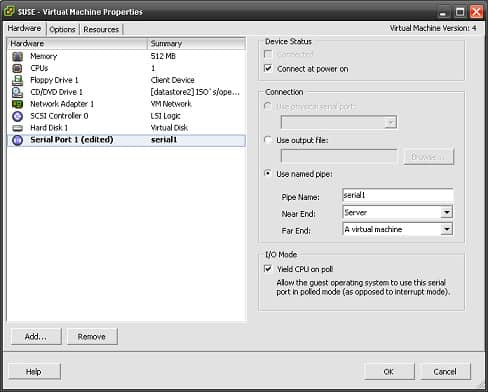
Within this article we will be creating a named serial pipe on 2 machines to allow us to connect to a virtual machines serial port. In this example we will use hyperterminal on a virtual XP machine to connect to the serial port of another virtual machine (in this case SUSE Linux) Adding a serial … Read more
Issue When trying to power on a machine you will recieve the error message, The attempted operation cannot be permited in the current state (Powered Off) Resolution This issue is caused by your Virtual Machine still have a reference to something in its configuration file which is no longer available. This could be a removed … Read more
Issue When trying to authenticate, and convert machines within your VMware convertor you recieve the following error : The session is not authenticated Fix Within windows go into your task manger and kill all of your VMware convertor processes that are currently running. Reference http://communities.vmware.com/thread/195575 Still have Issues ? If this has still not … Read more
When trying to authenticate, and convert machines within your VMware convertor you recieve the following error : The session is not authenticated Fix Close VMware Convertor Goto ‘Start / Run’ and type services.msc. Restart the services VMware vCenter Converter Agent and VMware vCenter Converter Server Relaunch VMware Convertor. Still have Issues ? If this … Read more
Issue When trying to connect to the console within the VI Client you receive the following error, Cannot connect to host my.esx.host.com: no connection could be made because the target machine actively refused it In this example you have the required ports open on both your firewall and your ESX box. You see … Read more
There are a number of worms which exploit the autorun feature of your removable media. This is normally caused by infecting your autorun.inf file. A counter measure to this is to disable the auto run feature. Fir3net.com has supplied the relevant registry key so that you can disable the auto feature. The registry key to … Read more
Remove the columns $4 $5 $12 and $13. awk ‘BEGIN{FS=OFS=” “}{$4=$5=$12=$13=””}{print}’ file.txt Break down each line and numbers each field. awk ‘{print NR”: “$0; for(i=1;i<=NF;++i)print “\t”i”: “$i}’ Add list of numbers within a file. awk ‘{total+=$0}END{print total}’ file
This short guide will show you how to set the default session timeout. We will set the TMOUT variable, of which is supported by both shells, Bash and Korn. To check your current timeout setting, enter the following, [root@localhost ~]# env | grep TMOUT To change this setting globally edit the /etc/bashrc. To change this … Read more
FFmpeg allows you to record, convert and stream digital audio and video in various formats. The installation guide can be found here Commands ffmpeg -i [source].flv -vn acodec copy [dest].mp3 Copy the sound of a video to an mp3 ffmpeg -i [source].avi -s 320×240 -b 1000k -vcodec wmv2 -ar 44100 -ab 56000 -ac 2 -y … Read more
How do I create a new Logical Volume / Partition ? We will be creating a new logical volume named DATA and mounting this on a new directory called DATA. First of we will create the logical volume, then we will create a file system on the Logical Volume. Once complete we will create a … Read more
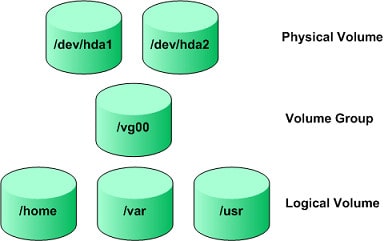
What is LVM ? LVM (Logical Volume Manager) for the Linux Kernel is a method of allocating hard drive space into logical volumes, this also allows for the easy creation, resizing, or removal of new or existing partitions. There are 4 main terms with LVM ….. physical volumes – These are your physical disks, or … Read more
In order to configure an interface in Ubuntu you will need to edit the following file /etc/network/interfacesBelow is an example, auto [INTERFACE]iface [INTERFACE] inet staticaddress [IP ADDRESS]netmask [NETMASK]network [NETWORK]gateway [GATEWAY] Once you have made the change to the interfaces file, run the following command /etc/init.d/networking restart
From time to time you may need to compare 2 files, i find this is useful for comparing old device configurations such as routers or firewalls to see what has changed. The program is fc (file compare). Which is a small windows program run via the Command Prompt. This is a short guide on how … Read more
Netsh.exe is a network administration tool that allows you to configure and monitor Windows-based computers at a command prompt. With the Netsh.exe tool, you can direct the context commands you enter to the appropriate helper, and the helper then carries out the command. Setting you IP address Below is the syntax for setting the IP … Read more
Basic Regular Expressions ^abc BOL abc at the beginning of the line abc$ EOL abc at the end of the line A* Any amount of characters matches any sqec or more of A`s i.e A, AAAAAA, AA, AAAAAAAAAA . Any 1 Character Any Character .* Any Characters Any Characters a[a-z0-9]c Range Between a and c … Read more
The windows command prompt openfiles command can be useful for viewing the openfiles used by the system. Errors When trying to use the following syntax openfiles /local You get the error message, The system global flag ‘maintain objects list’ is currently disabled This can be resolved via the following, openfiles /local on Viewing open … Read more
If your like me, and haven’t the time to waste trying to find and delete viruses, then this guide below is a must read. In this guide we will be securing the use of windows by creating a limited account. If you’re using a limited account when you visit an attacker’s Web site, it’s less … Read more
“google example” phrase Pages containing the exact phrase “google example” example -word exclude Pages containing the word example but not the word “word” example site:www.example.com site Pages containing example within website www.example.com ~example similar Pages containing words similar to example example filetype:ppt filetype Documents containing the word example and are ppt extenstions example|google either Pages … Read more
General Shortcuts dd delete a line x delete a character a append after cursor A append after line Useful for script editing :![command] allows you to run a command while still in VI :!! repeats previous command :! [command] % allows you to run a command, with % = current file name Motion h Move … Read more
1. The following 2 types of syntax are both ways to execute a script. Using these methods a second shell will be opened and once the script has finished the variables will not persist. chmod +x [script] sh [script] 2. Below shows you a way in which you can run your script using the current … Read more
Want to learn more about Operating Systems and Databases?