Routing Information Protocol (RIP) is a distance vector protocol used as an Interior Gateway Protocol (IGP) in moderate-sized autonomous systems (AS). Enabling RIP on a VR and an Interface set vrouter trust-vr router-id 10 set vrouter trust-vr protocol rip set vrouter trust-vr protocol rip enableset interface trust protocol rip enable Advertise the default route set … Read more
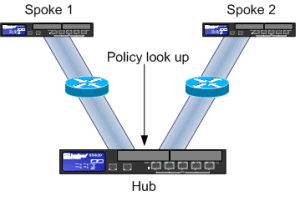
AC-VPN Auto-connect VPN works with a hub and spoke setup. Once static VPNs have been configured between all the spokes and the hubs, AC-VPN and NHRP (Next Hop Routing Protocol) is configured on each spoke and the hub.When traffic is initiated between 2 spokes the traffic is passed via the hub while a dynamic tunnel … Read more
Back to Back VPNs Back to Back VPNs allow you to create a tunnel for each spoke to the hub. The hub will then have a policy to allow traffic from one tunnel to the next. You can either place each tunnel within its own zone and create a policy between each of the zones. … Read more
By default, Netscreen (ScreenOS versions 6.0.0 or below) will cache the source MAC address from the initial packet for a new session. It will then use this MAC address for the return traffic. This can cause problems with external routers running VRRP where traffic is sent using a Virtual IP but a physical MAC address … Read more
There are 3 main types of traffic shaping on the Netscreen firewalls. Interface Based traffic shaping. Bandwidth allocated shaping in policies. Priority based traffic shapping in policies. Policy Based Policing Bandwidth: Traffic beyond this threshold is dropped at the ingress side of the security device.Guaranteed Bandwidth: Traffic below this threshold will be passed with highest … Read more
Internet Group Management Protocol (IGMP) is a communication protocol that multicasts messages and information among all member devices in an IP multicast group. Traffic is sent to a single MAC address but is forwarded out (via the local multicast router) to multiple hosts via multicast. It can be effectively used for gaming and showing online … Read more
How to Configure an Redundant Interface Below shows you how to configure redundant interfaces on a Netscreen firewall. In the example below all traffic will be passed over eth1, and in event of the link failing traffic will be sent across eth2. ns5gt-> set interface redundant1 zone inside ns5gt-> set interface redundant1 ip 10.1.1.20/24 … Read more
Virtual systems allow you to divide your Netscreen firewall into multiple logical firewalls (domains).Each VSYS (Virtual System) has 3 components which can be shared. Once shared they are available to other systems, virtual systems or root. The components are: Virtual Routers Zones Network Interfaces (Shared) How Virtual Systems work There are 3 ways in which … Read more
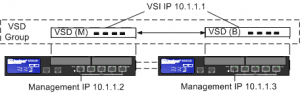
HA Setups There are 3 main types of HA setup, they are, Active / Passive – All traffic passes the active node. In the event of failure the backup firewall is activated, and traffic flow is resumed. Active / Active – Both Firewalls share the network load. In the event of failure all traffic is … Read more
In order to rekey a Netscreen VPN you will need to either clear the phase 1 or phase 2 “keys” from the gateway. Phase 1 being the IKE cookies and phase 2 being the SA`s (Security Association). To see an overview of your VPN`s run the command, `get vpn` In order to find the current … Read more
Below outlines Netcreens Attack Detection and Defense. This is by no means a full guide by acts as a general summary to the various terms and technologies. SCREEN Features legacy security protection, such as SYN, UDP and ICMP floods, Port scans and certain OS-specific DoS attacks. Deep Inspection Allows for inspection at the application layer … Read more
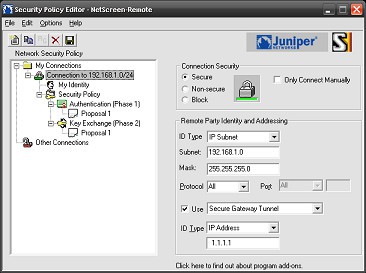
Below will show how to create a basic Remote Access VPN using Pre Shared Keys. This guide presumes that you already have the Netscren Remote VPN Client installed onto your local machine and was created using the following software versions : ScreenOS – 6.2.0r1.0 Netscren Remote VPN Client – 10.8.3 (Build 6) Below is an … Read more
VPN Monitoring This allows you to ping an IP address through the tunnel. In the event of the tunnel going down a SNMP trap will be generated. The settings can be found under “VPNs > AutoKey IKE > Edit > Advanced > VPN Monitor“. The “rekey” option will cause the Netscreen to continuously try and … Read more
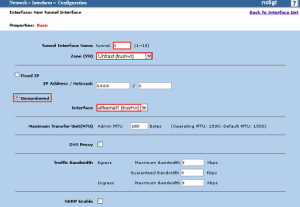
Below shows you how to create a route based vpn upon a Netscreen firewall using the firewalls gui interface. This tutorial was created using the ScreenOS version 6.2.0r1.0. The encryption domain for this guide will be, Local Gateway : 1.1.1.1 Local Endpoint : 10.1.1.25/24 Remote Gateway : 192.168.1.107 Remote Endpoint : 172.28.16.0/24 Create Tunnel Interface … Read more
This article will show you how to backup and restore your Juniper NSM. This article was written using NSM version 2008.2r1.Within NSM the HighAvailSvr contains processes that run in both HA and non-HA mode and handles database backups and a watchdog daemon to restart NSM processes in case of failure. Backup Even though you will … Read more
IP tracking allows you to track the connectivity of critical IP`s.This allows you to change your routing based on the connectivity of configured IP`s. There are 3 main points to Track IP : If a Tracked IP becomes unreachable, the weight of the address is added to the overall failed address total. If the total … Read more
Issue Logs received on the NSM are delayed by 6 minutes. The log viewer hangs for close to 6 minutes and then displays all the logs within a group. Also today`s log directory does not get created within /DevSvr/logs. Solution The NSM device server does a log tuple repair for each log received from the … Read more
Issue Logs received on the NSM are delayed by 6 minutes. The log viewer hangs for close to 6 minutes and then displays all the logs within a group. Also today`s log directory does not get created within /DevSvr/logs. Solution The NSM device server does a log tuple repair for each log received from the … Read more
Juniper introduces a new feature to the area of routing, called Virtual Routers. The model consists of: interfaces are applied to zones and zones are applied to Virtual Routers. Virtual routers allow for you to segment routing updates in and from the firewall/router. Virtual RoutersThere are 4 different types of routing tables that you can … Read more
Below are the 2 types of syslog messages. This can be useful to quickly determine on a NSM whether the logs are coming from the NSM or directly from the Firewall via syslog. Syslog from the Firewall Mar 18 17:56:52 [FW IP] [FW NAME]: NetScreen device_id=netscreen2 [Root]system-notification-00257(traffic): start_time=”2009-03-18 16:07:06″ duration=0 policy_id=320001 service=msrpc Endpoint Mapper(tcp) proto=6 … Read more