Below are some of the most useful commands for the administration within the Gaia CLISH. show commands save config save the current configuration show commands shows all commands show allowed-client all show allowed clients show arp dynamic all displays the dynamic arp entries show arp proxy all shows proxy arp show arp static all displays … Read more
NGX R65 HFA40 is a standard HFA and can be installed both on Security Gateways and on SmartCenter servers. R65.4 is a Management-based package that in addition to NGX R65 HFA40, also contains various new features and plug-ins. Upgrading from R65.4 can present some significant issues, due the release being a dead end. You will … Read more
When upgrading or installing Check Point on a Solaris platform rather then having to use the physical Check Point software CD, the following method allows you install/upgrade your Check Point software directly from the *.iso. Steps 1. Copy the iso file to your firewall / manager2. Run the following commands lofiadm -a <path>/<filename>.iso /dev/lofi/1mount -F … Read more
In order to to enable SecureID authentication you will need to generate an ‘sdconf.rec’ file from your ACE SERVER.You will then need to copy this file to the the ‘/var/ace‘ directory of your Check Point Firewall (if the directory does not exsist create one). At the point that your ACE SERVER and your ACE AGENT … Read more
Fir3net.com is pleased to release dbdel ver3.1. This is basically a wrapper for Check Points existing dbver tool, but allows you to remove 100`s of Database Revisions with one simple command string. Unlike dbver where you have to add each database revision id. This allows you to add the amount your want to remove and … Read more
The following will show you how to save a full IPSO backup via the clish CLI. This will backup all of the operating system configuration such as routes, proxy arps, interface settings etc. Backup This will create a backup within the /var/backup/ directory called ipso-backup_[date].tgz clish -c “set backup manual filename ipso-backup”clish -c “set backup … Read more
Below shows you the commands required to change the IP address of an interface within clish on a IPSO Nokia gateway, add interface eth1c0 address IP [NEW IP]/[NETMASK] delete interface eth1c0 address [OLD IP] set interface eth1 speed 100M duplex full active on set interface eth1c0 enable Below gives you an example : nokia-firewall[admin]# clish … Read more
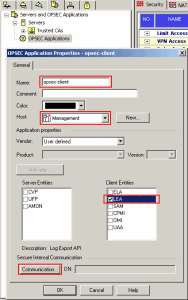
This guide will outline OPSEC LEA and how it works within a Check Point Infrastructure. What is OPSEC LEA ? The OPSEC LEA (Log Export API) provides the ability to pull logs from a Check Point device based on the OPSEC SDK. OPSEC LEA listens on port tcp/18184 on the device (OPSEC LEA Server) which … Read more
This guide will explain the various steps required to set up Enpoint Connect using a Multiple Entry Point setup. Ok, so to start with Endpoint Connect is Check Points new Remote Access VPN Client other then SSL Network Extender is the only client supported on Windows 7 64-Bit. The main problem with SNX (SSL Network … Read more
There are a number of Check Point Remote Access VPN terms and features. This guides attempts to explain them. Main Features Office ModeOffice mode allows your remote VPN user to receive an IP address designated by the Check Point Gateway, internal DHCP server or radius server. Visitor Mode Visitor Mode allows your VPN client to … Read more
You may find when you enable vistor mode on the Check Point object that the port is not listening when you run the command netstat -anp | grep vpnd | grep [your port] This can be down to one of the following : The devices management GUI is also listening on that port. For SPLAT … Read more
To debug VPND run the following command : vpn debug trunc To disable the debug run the commands : vpn debug off; vpn debug ikeoff To view the logs run the command : cd $FWDIR/log ; tail -f ike.elg vpnd.elg
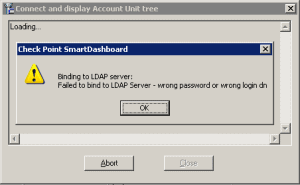
When trying to add an LDAP server to your SmartCenter and then clicking on your Domain within the Users tab (located at the bottom) you may receive the error : Failed to bind to LDAP Server – wrong password or wrong dn. Solution Normally this is down to the wrong password or wrong … Read more
Once you have exhusted the cphaprob commands and packet captures have been run for port UDP/8116 all to no avail you may want to run a debug on ClusterXL. The steps are detailed below : Enable debugging fw ctl debug -xfw ctl debug -buf 4096fw ctl debug -m cluster allfw ctl kdebug-f > file_name.txt Disable … Read more
All “true” clusters require that certain attributes are syncronised. So that in the event of a failover the newly promoted node can continue where the other node left off. In order to ensure that the State Tables of all your nodes within your Check Point Cluster are syncronised you will need to check the #VALS … Read more
First of all check to see if the Connectra Plugin is installed. [Expert@R65-Manager]# fwm verThis is Check Point SmartCenter Server NGX (R65) HFA_50, Hotfix 650 – Build 011Installed Plug-ins: Connectra NGX R62CM Uninstall To uninstall follow these steps : Run the plug in clean up ultility /opt/CPPIconnectra*R65/bin/plugin_preuninstall_verifier Then remove the package rpm -e CPPIconnectra-R65-00 Reboot … Read more
ClusterXL Check Point’s ClusterXL is a software-based Load Sharing and High Availability solution that distributes traffic between clusters of redundant Security Gateways High AvailabilityAllows for an Active-Standby setup were one node (Active) passes all the traffic. In the event of failure the Standby node will be promoted to the Active node. New Mode – Both … Read more
Within this example we will build a Route Based VPN between 2 SPLAT R65 NGX Check Point Firewalls. Static Routes will used to direct the traffic via the VPN Tunnel Interfaces. In this example both Firewalls are managed by the same manager. The gateways are : Site A – External 192.168.1.1 Inside 10.1.1.1 Site B … Read more
Below shows you the steps in order to create an SSL VPN on a Check Point Gateway : Create a new network object. This will be used as the remote users IP address. Name this “net_office-mode-IPs” Within the Check Point Object under Tolopogy > VPN Domain add your local domain. Within the Check Point Object … Read more
This example will show you how to create a certificate based VPN between 2 Check Point firewalls which are managed via different Smart Centre Servers. Please note that simplified mode VPN was used along with the Check Point version being R65. Site A Create VPN Community Within your Gateway Object add you local domain to … Read more