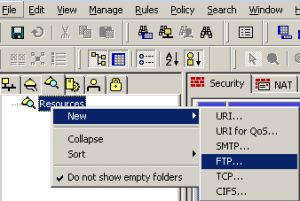
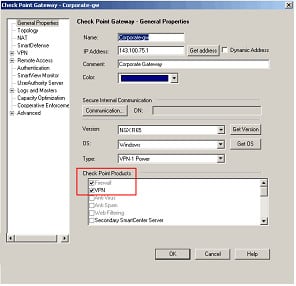
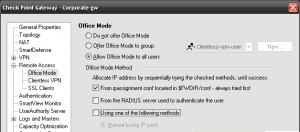
By default Client Authentication allows you to authenticate using HTTP (on port 900) or Telnet (on port 259). Both of which can pose security risks due to the username and passwords being sent un-encrypted. To secure Client Authenitcation follow the following steps : Change the following line in $FWDIR/conf/fwauthd.conf, 900 fwssd in.ahclientd wait 900 to … Read more
In order to to allow domain based objects through a Check Point firewall we need to understand how the domain objects actually work. When a packet hits a rule with a domain based object the Check Point does a reverse DNS looking up on the IP address against the domain object to see if they … Read more
What is EndPoint Connect ? Check Point`s Endpoint Connect software provides a number of client side security based features such as Anti-virus/Anti-spyware. Firewall/Email Protection, Program Control and Remote Access VPN. This document will only details and discuss the Remote Access VPN section of the Endpoint Connect Software. Note : This document will refer to the … Read more
When using the Check Point Web Visualization tool and trying to obtain the policy for a Cluster object you may receive one of the following errors/issues : The policy is saved as an .html file but it is only showing part of the policy. You receive one of the following errors when running the Web … Read more
If you are unable to clear the VPN SA`s using the “vpn tu” command you may want to try using the following commands vpn shell /show/tunnels/ike/peer/[remote gw ip] vpn shell /show/tunnels/ipsec/peer/[remote gw ip] vpn shell /tunnels/delete/IKE/peer/[remote gw ip] vpn shell /tunnels/delete/IPsec/peer/[remote gw ip] The reason to this can be down to a number of issues … Read more
When trying to establish a VPN tunnel you may find that the tunnel is built but you receive the error message : encryption failure: According to the policy the packet should not have been decrypted This can be down to either : Overlapping encryption domains for that of the local and remote endpoints. The local … Read more
This article will provide the required troubleshooting steps for resolving the issue of the “Interface Active Check” error within ClusterXL. First of all you spot there is an error within ClusterXL using the following command, root@firewall # cphaprob stat Cluster Mode: Legacy High Availability (Active Up) Number Unique Address Assigned Load State 1 192.168.12.1 100% … Read more
Below are some basic guidelines for troubleshooting Check Point Logging issues. Please note : This guide does not cover issues with any OPSEC LEA based issues. Please note : The FWD (Firewall Daemon) is responsible for sending and receiving the Check Point Logs on port tcp/257. {loadposition content_lock} logs being sent to the manager … Read more
In order to assign individual IPs and ranges to certains remote access users, Check Point provides a configuration file allowing you to configure your gateway as required. This configuration file is : $FWDIR/conf/ipassignment.conf This article we will outline some of the possible gotcha`s and also run through the required steps. Within this example we will … Read more
Issue Within the Smartview Monitor you may find that the device status is shown as “Problem”. Within Smartview Monitor you are unable to find any further details for what is causing the issue. Troubleshooting Steps This article isn’t a solution to the issue but more of a pointer to a stepping stone on finding what … Read more
Issue The initial SYN packets from your client to your server are translated by your Firewall into ACK packets. This in turn prevents the initial 3 way handshake establishing. Below shows an example, Inbound 15:32:19.546115 I 10.1.1.1.12345 > 192.168.1.1.1111: S 2292544025:2292544025(0) win 49640 <mss 1460,nop,wscale 0,nop,nop,sackOK> (DF) 15:32:22.924625 I 10.1.1.1.12345 > 192.168.1.1.1111: S 2292544025:2292544025(0) win … Read more
IPSO configuration sets allow you to change (or save) your systems complete current configuration. Allowing you to choose the required configuration (set) of your firewall with a few simple commands. This is useful for importing in configurations from other devices rather then setting up a box from scratch. Configuration Set directory The active configuration file … Read more
Oversimplified Executive Summary -A upgrade_export contains just Check Point configuration -A backup is an upgrade_export plus SPLAT OS configuration -A snapshot is a backup plus binary files, both Check Point and SPLAT OS -As a general rule of thumb, if your restoring on the same hardware a snapshot would be the easiest to use since … Read more
This script will determine which operating system is running then backup the OS accordingly, once complete it will securely send it to the manager. The script is based on R65 and all backups will be sent to “/var/tmp/backups” on the manager. Each time the backup is run it will write a system log confirming if … Read more
Issue The SmartView Monitor shows the status of your gateway as “Disconnected”. It takes for ages before your gateway shows as “Connected. No AMON (Application Monitoring) packets (tcp/18192) are leaving the SmartCentre Server for the gateway. Solution This can be down to issues within the Database files for the SmartView Monitor. Below will show you … Read more
Issue On Solaris 8 or Solaris 9, installing Check Point package fails with either : /var/opt/cp_tmp/CPsuite-R65/install/request: /var/opt/cp_tmp/CPsuite-R65/install/request: cannot openpkgadd: ERROR: request script did not complete successfullyInstallation of <CPsuite-R65> failed. or /opt/CPInstLog/Wrapper_R65.elg contains[25/02 11:52:36] Installing “Primary SmartCenter”[25/02 11:52:55] Installing of “Primary SmartCenter” failed ![25/02 11:52:57] Fail to install: Primary SmartCenter! See application usage format.[25/02 11:52:57] Wrapper … Read more
Issue When upgrading to R70 on SPLAT you may receive the following error, CPwrapper: Wrapper part one completed successfully, data saved Upgrading the operating system. Preparing to upgrade Check Point Products. status=1 Exiting .. Patch installation failed. Please Note : This refers to a copied iso file which has been copied to the device and … Read more
This guide attempts to explain Proxy ARP upon the Check Point SPLAT platform. 1. What is Proxy ARP ? There are 2 ways to get a packet to a device. Route the packet to the device. Add a proxy ARP entry so that the network host answers to the ARP queries for IP addresses not … Read more
Issue When allowing eBGP traffic through a Check Point Firewall you may receive the following error message on your BGP peered routers. (This error may occur at the point of pushing a policy to your Check Point Firewall), TCP-6-BADAUTH: Invalid MD5 digest from [Source IP]:[Source Port] to [Dest IP]:179 Solution This is down to the … Read more
Below are the steps required to migrate a Provider-1 CMA to a Smart Centre Server. This tutorial was based on exporting and migrating from R55 to R65 and will involve the following steps, 1. Export the CMA on the Provider-1 2. Import the CMA into Smart Centre 3. Export and detach license 4. Update the Smart Centre Object … Read more