Introduction RAM Cache is a feature that provides the ability to serve content to your clients directly from the memory of your F5 appliance. This benefits both client and server by reducing response latency and also server load. What is Cached ? Heres a summary, The following items are cached, All 200, 203, 206, 300, … Read more
Issue When viewing the UIE persistence records you observe that the Client Addr field is not populated. root@f5ltm(Active)(tmos)# show ltm persistence persist-records all-properties Sys::Persistent Connections universal – 172.16.100.200:80 – 192.168.1.31:80 ———————————————————– TMM 0 Mode universal Key 8ffa6c0012825a76b3b68d10a9c68ad3 Age (sec.) 4 Virtual Name VS-172.16.100.200-80 Virtual Addr 172.16.100.200:80 Node Addr 192.168.1.31:80 Pool Name POOL-172.16.100.200-80 Client Addr :: … Read more
TACACS+ accounting was first supported within BIG-IP version 10.2.0. Within this article we will show your the commands required to enable this feature. Configure First of all you will need to enable accounting within your authentication settings (this can be found within the GUI under ‘System / Users / Authentication’) modify sys db config.auditing.forward.destination value … Read more
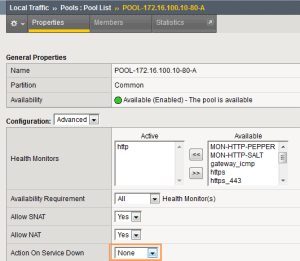
Background “Action on Service Down” defines the action that should be taken once the pool member has been marked as “down” by the associated healthcheck, after it has been selected as the load balancing target for a connection. Configuration To configure “Action on Service Down” goto the GUI and then to ‘Local Traffic / Pools’. … Read more
BACKGROUND In order to to maintain persistence between services (such as HTTP and HTTPS) on a single Virtual Server two persistence methods are available ; Cookie Hashing and Source IP. In order to perform “true” Cookie (insert) persistence across services an iRule is required. Note : Though cookie persistence (insert) can be performed within the … Read more
Question How do I configure my F5 to equally distribute HTTP requests so that each request goes to a different server ? Answer To ensure that each request goes to a different server rather then all requests for a single connection going to the same server you will need to: Disable CMP Clustered Multi-Processing (CMP) … Read more
Within this article we look at how to rate-limit traffic via the use of an iRule. iRule The Table Command So that we can rate-limit traffic the iRule command ‘table’ is used. The table command (as the name suggests) provides the ability to create, delete, and append tables, along with being able to define timeouts … Read more
One great feature of the F5 Local Traffic Manager is ability to distribute traffic basic on its geographical location. This feature was introduced within v10.1 thanks to F5`s partnership with Neustar (previously) Quova. The geolocation component uses a (local) IP geolocation database (on the F5) to determine the geographically location of the IP address. To … Read more
Issue You may observe that ICMP response (return) traffic is randomly dropped by the F5. This behaviour occurs when using tagged VLANs and packet-filters on the F5.Below shows the issue in further detail. An ICMP Ping is initiated from the F5 and a packet capture is run. We can see from the Ping that the … Read more
When trying to view your SNMP configuration from within the Web UI you may observe the following error: No object identifier specified in context Solution To resolve this remove the community via bigpipe and save. You will then notice that the SNMP community has been removed via the Web UI. This can then be re-added … Read more
The F5 LTM provides the ability to configure a HA (High-Availability) based setup. Configuring HA ensures that traffic is still processed even in the event of a failure (such as a software or hardware). Within this article we will explain and discuss a Active / Standby HA F5 setup. This allows one unit to pass … Read more
Configuration Files /config/bigip.conf main configuration file containing objects for local application traffice such as pools, virtuals servers, pools etc. /config/bigip.license system licenses /config/bigip_base.conf networking components (bigpipe base load) not sync`d for HA setups. /config/bigip_local.conf stores virtuals servers for GTM /config/bigip_sys.conf stores the Linux/UNIX configuration objects /etc/alertd/alert.conf defines custom SNMP OID`s. UCS (User Configuration Set) A … Read more
When running the BIG-IP LTM (10.2.3) virtual appliance on ESX4 you may observe that only the management interface is seen by the system. [root@localhost:Active] config # b interface showINTERFACEKey Speed Pkts Pkts Drop Coll Bits Bits Errs Trunk Mbps in out in outmgmt UP 100 FD 511 8 0 0 266144 5056 0 Solution To … Read more
Overview The OneConnect feature works with HTTP Keep-Alives to minimize the number of server-side TCP connections by reusing existing connections for further HTTP requests.“OneConnect” has 2 methods. They are : OneConnect Profile and OneConnect transformations. Both of which are explained within this article. HTTP Requests Overview HTTP/1.1 requests – HTTP/1.1 dictates that HTTP Keep-Alive connections … Read more
When running the BIG-IP LTM (10.1) Virtual appliance on ESX4 you may observe the following error message (within the /var/log/message file): Unable to attach to PCI device 02:02.00 for Interface 1.1 This results in both interfaces forming the status of un-initialized and in turn failing to pass traffic. Solution To resolve this define each interface … Read more
Adaptive Reapers Adaptive reapers provide the ability for the system to automatically clear connections at the point of a predefined threshold being reached. This provides both system and connection stability during the point of a Denial of Service attack.At the point memory usage reaches the low water mark threshold (default %85) all half open connections … Read more
Installation and upgrade of software on the F5 LTM is extremely straight forward. Each image is installed onto a slot, the slot can then be upgraded or re-imaged. 1. Transfer Image Create a directory ‘[root@f5:Active] config # mkdir /shared/images/legacy’ Copy the iso image to the directory ‘/shared/images/legacy’ using scp. Move to the directory ‘[root@f5:Active] config … Read more
Within this article we will show you the necessary steps required to create a sorry page (containing an image) that will be published when there are no available pool memebers for the spefic VIP (Virtual Server). Note : This example is based upon serving a png image. Encode Image First of the image that will … Read more
The F5 LTM allows for the transmission of syslog messages using TCP connections via the use of the syslog-ng daemon. Syntax In order to configure TCP syslog the following command(s) are used, bigpipe syslog include ‘”destination d_tcp { tcp(\”<SYSLOG IP>\” port(<PORT>));};log { source(local);\ destination(d_tcp);};”‘bigpipe save all Confirmation To confirm the configuration has been added use … Read more
The following commands are based upon F5 LTM 10.1.0 (and higher) bigpipe bigtop show statistic summary b self show show self IP`s b vlan show show vlans b interface show show interfaces b pool [pool name] show show pool b virtual [virtual name] show show vs b snat list list snats b route domain list … Read more