Within this article we will look at the configuration steps required adding headers to your HTTP based traffic. The 2 headers we will look at are X-Forwarded-Proto and X-Forwarded-For. These headers are described below. X-Forwarded-Proto – Inserts the protocol used between the client and the intermediary device (such as the LoadBalancer). Typically used when protocol … Read more
The F5 LTM provides the ability to configure a HA (High-Availability) based setup. Configuring HA ensures that traffic is still processed even in the event of a failure (such as a software or hardware). Within this article we will explain and discuss a Active / Standby HA F5 setup. This allows one unit to pass … Read more
The Brocade ADX offers a range of options for troubleshooting CSW (Content Switching) policies.Within this article we will look the main troubleshooting feature URL Debug and also provide the various show commands available when troubleshooting CSW. URL Debug The URL debug option allows you to debug the CSW policy flows based on a given IP. … Read more
Configuration Files /config/bigip.conf main configuration file containing objects for local application traffice such as pools, virtuals servers, pools etc. /config/bigip.license system licenses /config/bigip_base.conf networking components (bigpipe base load) not sync`d for HA setups. /config/bigip_local.conf stores virtuals servers for GTM /config/bigip_sys.conf stores the Linux/UNIX configuration objects /etc/alertd/alert.conf defines custom SNMP OID`s. UCS (User Configuration Set) A … Read more
When running the BIG-IP LTM (10.2.3) virtual appliance on ESX4 you may observe that only the management interface is seen by the system. [root@localhost:Active] config # b interface showINTERFACEKey Speed Pkts Pkts Drop Coll Bits Bits Errs Trunk Mbps in out in outmgmt UP 100 FD 511 8 0 0 266144 5056 0 Solution To … Read more
Overview The OneConnect feature works with HTTP Keep-Alives to minimize the number of server-side TCP connections by reusing existing connections for further HTTP requests.“OneConnect” has 2 methods. They are : OneConnect Profile and OneConnect transformations. Both of which are explained within this article. HTTP Requests Overview HTTP/1.1 requests – HTTP/1.1 dictates that HTTP Keep-Alive connections … Read more
When running the BIG-IP LTM (10.1) Virtual appliance on ESX4 you may observe the following error message (within the /var/log/message file): Unable to attach to PCI device 02:02.00 for Interface 1.1 This results in both interfaces forming the status of un-initialized and in turn failing to pass traffic. Solution To resolve this define each interface … Read more
Adaptive Reapers Adaptive reapers provide the ability for the system to automatically clear connections at the point of a predefined threshold being reached. This provides both system and connection stability during the point of a Denial of Service attack.At the point memory usage reaches the low water mark threshold (default %85) all half open connections … Read more
The Brocade ADX offers 2 methods in which to configure FTP SLB (Server Load Balancing). These methods are : Layer 3 – Uses the sticky and concurrent connection settings to provide FTP SLB.Layer 4-7 – Provides FTP SLB via the use of FTP application awareness (introduced in version 12.3.1d). 1. Layer 3 To Load-balance either … Read more
Installation and upgrade of software on the F5 LTM is extremely straight forward. Each image is installed onto a slot, the slot can then be upgraded or re-imaged. 1. Transfer Image Create a directory ‘[root@f5:Active] config # mkdir /shared/images/legacy’ Copy the iso image to the directory ‘/shared/images/legacy’ using scp. Move to the directory ‘[root@f5:Active] config … Read more
Within this article we will look at the two ways in which to NAT traffic. Source NAT Pool This examples provides the commands required to configure source NAT via the use of a pool and ACL. This allows you to source NAT a number of internal hosts behind the ADX to a single IP address. … Read more
Nested CSW rules provides the ability to perform Boolean (AND, OR etc) based conditions on standard csw rules. Within this example we will be : Redirecting any request that has a host header of ‘PRODUCTION.example.com’ and containing a URL request for /FOLDER/index.html to ‘/REDIRECT/index.html’ Balancing any request that has a host header of ‘STAGING.example.com’ and … Read more
Below shows the basic steps for upgrading a Brocade ADX. Copy Image First of all the image is copied from a TFTP server. Note : The option ‘secondary’ is used to ensure that the primary image is not overwritten. adx# copy tftp flash [tftp server ip] ASR12301c.bin secondary Check Flash Next, check the image has … Read more
The Brocade ADX offers 2 main persistence methods ; sticky and cookie. Within this article we will look at both of these methods and the various configuration options of each one. Types Sticky With sticky traffic is sent to the same server based on the clients IP for duration of the sticky timeout duration. Sticky also … Read more
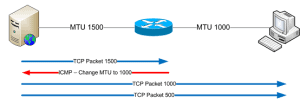
What is MTU ? When sending traffic across a network, computers use something called an MTU (Maximum Transmission Unit). This (network interface) setting dictates the size of the largest frame it can send across the network. Below shows the MTU default, Network MTU(Bytes) X.25 576 IEEE 802.3/802.2 1492 Ethernet 1500 FDDI 4352 Token Ring 17914 … Read more
Issue The Cisco CSS is showing a high level of CPU usage, even though the networking throughput does not appear excessively high nor is there a large number of EQL or DQL`s configured. CSS11501# sh system-resources cpu Chassis CPU Utilizations Module Name Module 5Sec 1Min 5Min —————————————————- CSS501-SCM-INT 1 90% 88% 75% CSS501-SSL-C-INT 2 0% … Read more
A typical issue when SSL termination is performed on the load balancer is that URL redirects from the backend servers still contain a ‘http://’ prefix rather then ‘https://’ Within this article we will show the required commands for creating a Content Switching Policy that will rewrite any URL`s containing a ‘http://’ prefix to ‘https://’ for … Read more
Within this article we will show you the necessary steps required to create a sorry page (containing an image) that will be published when there are no available pool memebers for the spefic VIP (Virtual Server). Note : This example is based upon serving a png image. Encode Image First of the image that will … Read more
The F5 LTM allows for the transmission of syslog messages using TCP connections via the use of the syslog-ng daemon. Syntax In order to configure TCP syslog the following command(s) are used, bigpipe syslog include ‘”destination d_tcp { tcp(\”<SYSLOG IP>\” port(<PORT>));};log { source(local);\ destination(d_tcp);};”‘bigpipe save all Confirmation To confirm the configuration has been added use … Read more
Summary The Brocade ADX provides DoS protection within the hardware layer. This allows for a much greater total of DoS attacks to be processed.Such attacks that are recognised and protected against at the hardware layer are : deny-all fragments Fin-with-no-ack icmp-fragment ip-option land-attack large-icmp ping-of-death syn-and-fin-set syn-fragments TCP-no-flags unknown-ip-protocol xmas-tree At a software layer the following attacks … Read more