Within v11.x of LTM/GTM BigIP certificates are located within a folder called ‘certificate_d’ under the necessary partition folder. i.e /config/filestore/files_d/Common_d/certificate_d By default everything is placed within the common partition folder ‘Common_d’. Below shows an example root@gtm:Active:Standalone] # ls -l /config/filestore/files_d/Common_d/certificate_d total 32 lrwxrwxrwx 1 root root 33 Sep 30 02:52 :Common:ca-bundle.crt_1 -> /config/ssl/ssl.crt/ca-bundle.crt lrwxrwxrwx 1 … Read more
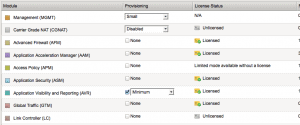
Summary Introduced within TMOS 11.0, AVR (Application Visibility and Reporting) allows you to gather statistics on the performance of applications, such as pool members, virtual servers etc. From within these statistics, analytics such as latency, response times and throughput (to name but a few) can then be viewed either via either the WebUI or the … Read more
Purpose The purpose of this document is to explain the role and functions of the CSW Pseudo Stack. Summary Within the Brocade ADX feature set is the ability to forward traffic based on layer 7 attributes (such as host header, URI etc.). This is achieved by enabling content switching (CSW). In order for the the … Read more
Question How do I show the CPU usage for the management processor ? Answer To see the CPU usage on the MP (Management Processor) the following command is used, SSH@adx# show cpu-utilization peak: 41.4 percent busy at 5520 seconds ago 7243 sec avg: 10.3 percent busy 1 sec avg: 1.0 percent busy 5 … Read more
Problem When using the command “persist uie add” in conjunction with the “node” command within an iRule the F5 issues a RST back to both the client and server. Background Lets look at an example. First we`ll look at the configuration and then the resulting behaviour. Configuration You have the following configured, You have persistence … Read more
The auto last hop feature ensures that traffic is sent back via the same hop from which it was sent. This is done by the F5 forwarding traffic to the MAC address of the last hop. The last hop MAC address is recorded within the connection table along with the source and destination addresses.
After finding this funky little command the other day I thought the readers of Fir3net may find it useful. Its especially handy when your LTM/GTM is placed directly onto the public network i.e not behind a firewall. Command To restrict access to the Web UI the following command is used, root@f5ltm1(Active)(tmos)# modify sys httpd allow … Read more
Background The Brocade ADX offers 3 main types of layer 7 healthchecks. These are, Server Healthcheck – Server healthchecks are configured on the real server itself. Once configured it issues a healtcheck to the real server based on the port/protocol configured. Port-Policy – A port-policy is a policy that contains all of your parameters for … Read more
The F5 offers a number of different ways to you can represent your data via iRules such as variables, tables, datagroups and arrays. Within this article we will look at the variables. There are 2 main types of variables, local and global. Local Local variables represent data within your local namespace, and are assigned the … Read more
Introduction RAM Cache is a feature that provides the ability to serve content to your clients directly from the memory of your F5 appliance. This benefits both client and server by reducing response latency and also server load. What is Cached ? Heres a summary, The following items are cached, All 200, 203, 206, 300, … Read more
Issue When viewing the UIE persistence records you observe that the Client Addr field is not populated. root@f5ltm(Active)(tmos)# show ltm persistence persist-records all-properties Sys::Persistent Connections universal – 172.16.100.200:80 – 192.168.1.31:80 ———————————————————– TMM 0 Mode universal Key 8ffa6c0012825a76b3b68d10a9c68ad3 Age (sec.) 4 Virtual Name VS-172.16.100.200-80 Virtual Addr 172.16.100.200:80 Node Addr 192.168.1.31:80 Pool Name POOL-172.16.100.200-80 Client Addr :: … Read more
TACACS+ accounting was first supported within BIG-IP version 10.2.0. Within this article we will show your the commands required to enable this feature. Configure First of all you will need to enable accounting within your authentication settings (this can be found within the GUI under ‘System / Users / Authentication’) modify sys db config.auditing.forward.destination value … Read more
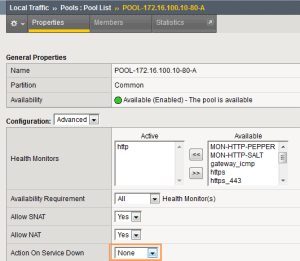
Background “Action on Service Down” defines the action that should be taken once the pool member has been marked as “down” by the associated healthcheck, after it has been selected as the load balancing target for a connection. Configuration To configure “Action on Service Down” goto the GUI and then to ‘Local Traffic / Pools’. … Read more
The Brocade ADX offers two methods for binding multiple ports to a single healthcheck ; via the use of a port profile or by using healthcheck element groups. The main caveat when using a port profile is that you can only bind a non well-known port to the healthcheck of a well known port. And … Read more
The ADX provides a number of loadbalancing methods (also known as predictors) such as round robin and least connections.Within this article we will look at the Dynamic Weighted loadbalancing method. Summary The Dynamic Weighted balancing method is a dynamic predictor that allows you to distribute traffic based upon the resource usage of your server (such … Read more
BACKGROUND In order to to maintain persistence between services (such as HTTP and HTTPS) on a single Virtual Server two persistence methods are available ; Cookie Hashing and Source IP. In order to perform “true” Cookie (insert) persistence across services an iRule is required. Note : Though cookie persistence (insert) can be performed within the … Read more
Question How do I configure my F5 to equally distribute HTTP requests so that each request goes to a different server ? Answer To ensure that each request goes to a different server rather then all requests for a single connection going to the same server you will need to: Disable CMP Clustered Multi-Processing (CMP) … Read more
Within this article we will look into the ‘keepalive’ command. As this command isn’t greatly documented I thought this would be a good opportunity to explain in a little more detail how it works. Keepalive vs Keep-alive First of all it is worth noting that the ‘keepalive’ command (which is configured under the real server) … Read more
Within this article we look at how to rate-limit traffic via the use of an iRule. iRule The Table Command So that we can rate-limit traffic the iRule command ‘table’ is used. The table command (as the name suggests) provides the ability to create, delete, and append tables, along with being able to define timeouts … Read more
Symptoms You may find that when enabling SSL (termination) and a CSW policy your SSL session fails due to the ADX issuing a RST back to the client. When running a url debug via rcon you see the following : URL: process client packet return error CSW_PARSE_ERROR_MAX_MEMORY[80] ??? Free multiple stored packets. HTTP Split State: … Read more