There are 3 areas with NSM. DevSvr, GuiSvr and HaSvr. The following files and paths are based on NSM 2008. Below shows the main path structure (Redhat) and what each Server (Svr) does. /usr/netscreen/DevSvr/ – DevSvr – Logging and the NSM database/usr/netscreen/GuiSvr/ – GuiSvr – NSM GUI /usr/netscreen/HaSvr/ – HaSvr – Backups and High Availability. … Read more
Source NAT Interface Based Source NAT – Allows the traffic to NAT its source IP to the IP address of the egress interface which it leaves. This feature is enabled on the interface via “NAT-Mode”. And can be disabled via using “Route Mode”. MIP – Provides a static NAT for the specified host, in which … Read more
The below is based on the netscreen ns5gt and the firefox web browser. Issue After setting up your netscreen for DDNS, in the UI of your netscreen the last response is shown as ‘not-init‘ and within the CLI it shows ‘successful updates: 0‘. To get the id of you ddns config run just the command … Read more
Rule Processing Order The general processing order is as follows, Look for a policy between the ingress and egress zones If no policy is found (in step 1), search for a Global policy If no Global policy is found and if the ingress zone is same as the egress zone, apply the intra-zone block i.e … Read more
This article was written based on the ns5gt. By default all interfaces are set to auto negotiate. Show Duplex ns5gt-> get interface trust port phy Port 1: link is up, 100 Mbps, auto negotiated to full duplex Port 2: link is up, 100 Mbps, auto negotiated to full duplex Port 3: link is up, 100 … Read more
In this article we will be looking at the various console commands available to us on the Juniper Netscreen. From entering the get command we can see the current console settings along with console session details, ns5gt-> get console Console timeout: 10(minute), Page size: 22/22, debug: buffer privilege 200, config has not been changed! ID … Read more
Have you lost, forgotten, misplaced the NSM password ?Below are the steps to reset your “super” account password, NSM 2006.x and below Log into the NSM via SSH as root Stop the NSM Server (you should be able to find the init scripts in /etc/init.d) Run the following command /usr/netscreen/GuiSvr/utils/.hashPasswd <new password>, you will receive … Read more
A great debugging tool feature on the Juniper Netscreens is snoop. Snoop is packet capturing tool which allows you to analysis your traffic on a per packet level. Below shows you a example of enabling snoop and viewing its output, 5gt->undebug all5gt->snoop5gt->snoop filter ip 10.1.1.1005gt->snoop info5gt->clear db 5gt->get db str Ok, so what do these … Read more
Interface get counter statistics Show interface statistics (CRC errors etc) get interface trust port phy Show physical ports for a certain zone get driver phy Show all link states of interfaces get counter statistics interface ethernet3 Show hardware stats on interface set interface [interface] no-subnet-conflict-check Allows you to configure multiple interfaces in the same IP … Read more
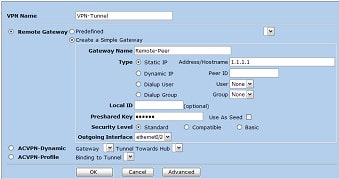
This guide will show you how to create a policy based VPN on a Netscreen firewall. The encryption domain will be, Local Gateway : 2.2.2.2 Local Endpoint : 10.1.1.0 /24 Remote Gateway : 1.1.1.1 Remote Endpoint : 192.1.1.0 /24 1. Log into the Netscreens GUI 2. Click VPNs > Autokey IKE (Autokey IKE Screen is … Read more
In order to debug and obtain output for the traffic flow through the Netscreen, you will need action a couple of commands, these are shown below, 5gt-> unset ff filter 0 removed 5gt-> undebug all 5gt-> clear db 5gt-> set ff dst-port 8080 filter added 5gt-> debug flow basic 5gt-> get db str Below shows … Read more
Heres a couple of issues I ran into when adding some devices to the NSM, When trying to enable NSM via the GUI you get “No initial ID configured. NSM agent remains disabled” The communication between nsm and screenos is based on public key authentication. You don’t have to enable NSM manually. Cant import the … Read more
Below shows you the various MSS settings that can be set via the CLI, MSS of netscreen – set tcp mss 1460 MSS for VPN traffic – set flow tcp-mss 1460 MSS for clear traffic – set flow all-tcp-mss 1460
Below shows you how to configure basic NSRP cluster, prior to below you would of needed to configure your interfaces. Node A set nsrp rto-mirror syncset nsrp monitor interface eth1set nsrp monitor interface eth3set nsrp cluster id 1set nsrp vsd-group id 0 priority 100save Node B set nsrp rto-mirror syncset nsrp monitor interface eth1set nsrp … Read more
Below is how to set up the basic configuration on a Netscreen firewall.Also bear in mind that if you are setting up a NSRP cluster, be sure to set the management IP to a different IP to the management interface. set hostname myfirewallset ssh enable set admin name rootset admin password mypasswordset admin manager-ip 192.168.1.1 … Read more