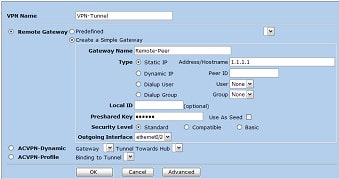
This guide will show you how to create a policy based VPN on a Netscreen firewall. The encryption domain will be, Local Gateway : 2.2.2.2 Local Endpoint : 10.1.1.0 /24 Remote Gateway : 1.1.1.1 Remote Endpoint : 192.1.1.0 /24 1. Log into the Netscreens GUI 2. Click VPNs > Autokey IKE (Autokey IKE Screen is … Read more
Below will configure you interface with vlan50, ip address 1.1.1.1 with a name of outside. This will also bring up the interface. nameif ethernet0 outside security0ip address outside 1.1.1.1 255.255.255.0interface ethernet0 autointerface outside vlan50
To enable ssh on your PIX (6.3) run the following, hostname myfw domain-name home.net ca gen rsa key 1024 ssh 0 0 inside ssh timeout 60 passwd 123 ca save all When you go to log in your username will be pix and the password 123.
The following command will allow you to add a default route to your PIX device: route [interface name] 0 0 [default gw ip] Example route outside 0 0 1.1.1.1
In order to debug and obtain output for the traffic flow through the Netscreen, you will need action a couple of commands, these are shown below, 5gt-> unset ff filter 0 removed 5gt-> undebug all 5gt-> clear db 5gt-> set ff dst-port 8080 filter added 5gt-> debug flow basic 5gt-> get db str Below shows … Read more
Heres a couple of issues I ran into when adding some devices to the NSM, When trying to enable NSM via the GUI you get “No initial ID configured. NSM agent remains disabled” The communication between nsm and screenos is based on public key authentication. You don’t have to enable NSM manually. Cant import the … Read more
Below shows you the various MSS settings that can be set via the CLI, MSS of netscreen – set tcp mss 1460 MSS for VPN traffic – set flow tcp-mss 1460 MSS for clear traffic – set flow all-tcp-mss 1460
Problem You find that your gateway is blocking SSH connections and showing in the logs even though you have the ssh and ssh_version_2 protocols added to your rule. message_info: SSH version 1.x is not allowed Reason On closer inspection when you look at the ssh_version_2 protocol object it says in the comment, Secure Shell, version … Read more
Below shows you how to configure basic NSRP cluster, prior to below you would of needed to configure your interfaces. Node A set nsrp rto-mirror syncset nsrp monitor interface eth1set nsrp monitor interface eth3set nsrp cluster id 1set nsrp vsd-group id 0 priority 100save Node B set nsrp rto-mirror syncset nsrp monitor interface eth1set nsrp … Read more
Below is how to set up the basic configuration on a Netscreen firewall.Also bear in mind that if you are setting up a NSRP cluster, be sure to set the management IP to a different IP to the management interface. set hostname myfirewallset ssh enable set admin name rootset admin password mypasswordset admin manager-ip 192.168.1.1 … Read more
HFA stands for Hot fix accumulator. Which is a bit like a Windows Service Pack but for your Check Point Firewall.The documentation from the Check Point site on how to install these, is very good, and also contains the IPSO installation instructions. Below are the basic instructions on how to install the latest HFA 30 … Read more
To create a static route script, create a file in /etc/init.d/ with the routes included. Below is an example, #!/bin/bash /sbin/route add -host 192.168.1.25 gateway 10.1.1.25/sbin/route add -host 192.168.1.19 gateway 10.1.1.19 exit 0 Then link this to the startup script, by running, ln -s /etc/init.d/staticroutes /etc/rc3.d/S68Staticroutes You can then do the same for the static … Read more
If you cannot delete the administrator via cpconfig, or the fwm commands then remove the administrator (the complete line) from the following file /$FWDIR/conf/fwmusers
Issue There may be a time where you install the wrong policy onto a Check Point Firewall. This can block your connections, and screw which traffic is allowed through the firewall. Resolution These steps will show you how to remove and reinstall the correct policy via the CLI on the manager (SCS), 1. First of … Read more
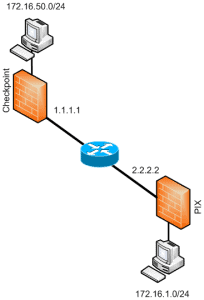
Below provide sample configurations required for building a site to site VPN between a Cisco PIX and a Check Point Firewall. PIX Configuration (config)#isakmp enable outside (config)#isakmp policy 10 (config-isakmp-policy)# encryption aes-256 (config-isakmp-policy)# hash sha (config-isakmp-policy)# authentication pre-share (config-isakmp-policy)# group 1 (config-isakmp-policy)# lifetime 86400 (config)#isakmp key shabba address 1.1.1.1 netmask 255.255.255.255 no-xauth (config)#access-list ED … Read more
Method 1 Even though this maybe more of an article for the Linux area, the only reason I came across this is trying to move the output of a upgrade_export from my SPLAT box, so hence it being under Firewalls – Check Point. If you keep getting prompted with a password box when trying to … Read more
Stealth Rule The first rule in the rule base which prevents access to the firewall itself. Implicit Drop / Clean Up Rule This is added by the firewall at the bottom of the rule base. Its role is to drop any traffic that hasn’t been matched to any of the previous rules.
In order to debug NAT on a checkpoint we need to obtain information via the following, Set the debugging buffer to 2 KB Enable 2 debugging flags Output your data Then to reset the debugging flags. The commands are, fw ctl debug -buf 2048fw ctl debug xlate srcfw ctl kdebug -f >& /tmp/kdebug.outfw ctl debug … Read more
FWM Firewall Management e.g. the SmartCenter ICA Internal CA, normally SmartCenter SIC Secure Internal Communication SCS Smart Centre Server VTI Virtual Tunnel Interface (VPNs) MDG Multi Domain GUI (Provider-1) MDS Multi Domain Server, Manager or Container (Provider-1) CMA Customer Management Add-on (Provider-1) – “Smart Center Server” MLM Multi Customer Log Module (Provider-1) CLM Customer Log … Read more
DiffServ (Differentiated Services)A layer 3 protocol, defined by the IEFT. Used for adding QoS to IP networks. WFRED(Weighted Flow Random Early Drop)A process for managing packet buffers, by dropping packets during periods of network congestion.This is transparent to the user and requires no configuration. IQ (Intelligent Queuing Engine)Using information from the Check Point INSPECT engine … Read more